Tools for auto-generating API references from OpenAPI and AsyncAPI specs
Find your fit among hosted portals, embeddable viewers, and CLI generators.

Auto-generating API reference documentation from OpenAPI and AsyncAPI specs has become the baseline expectation, and the tooling has matured enough that most teams can pick a solid option without much guesswork. The real question is which tool fits your rendering needs, your customization requirements, and how documentation slots into the rest of your infrastructure. This piece maps that landscape category by category, so you can narrow the field before you get lost comparing individual features.
Let's start with what a generator actually does, because the boundary matters more than people assume. Feed it a structured spec and it produces endpoint lists, parameter tables, request and response schemas, auth flow descriptions, and error code references. Quickstart guides, conceptual walkthroughs, tutorials, changelogs, and architecture overviews are never part of the output. Those still take a human who understands the product, not just the schema. According to the State of Docs Report, teams rank two things at the top of their documentation wish list, and both are automation-related: automatic doc creation the moment a spec is uploaded, and automatic updates when that spec changes. The appetite for automation is obvious, but the generator only solves one layer of the problem; you still need a strategy for everything the generator can't touch. Static, hand-maintained reference docs are exactly the failure mode these tools exist to prevent. Once your docs drift from your actual spec, developer trust erodes quickly — and that drift is difficult to recover from.
How the tool landscape is structured before you evaluate any single option
Three categories exist, and each implies a different integration pattern. Hosted portals are SaaS platforms that own the entire publishing environment, spec upload through public-facing site. Embeddable viewers are open-source libraries and components you drop into a site or developer portal you already run. Doc generators and CLIs are command-line tools that output static files or feed into a larger pipeline.
Which category fits depends on what you've already built. Teams with an existing developer site tend to reach for embeddable viewers. Teams without any publishing layer at all gravitate toward hosted portals, because standing up your own site just to display API docs is a lot of infrastructure for one job. Teams running CI/CD-driven documentation pipelines want CLI generators they can slot into an existing build step.
One more distinction worth sitting with before you evaluate anything: OpenAPI and AsyncAPI are different shapes of problem. OpenAPI organizes itself around paths and HTTP methods; you hit an endpoint, you get a response, the object model reflects that request/response symmetry. AsyncAPI organizes itself around channels, operations, and messages, a different mental model because events don't wait for a request. That difference means not every tool serves both specs well, and a few don't try. Knowing this upfront saves you from evaluating a REST-focused renderer against an event-driven use case it was never built for.
Swagger UI and Redoc: the established baseline most teams already know
Swagger UI is still the tool most engineers picture when they hear "API docs." It's the de facto standard for interactive reference, sitting at tens of thousands of GitHub stars, and it supports the full range from OpenAPI 2.0 through 3.2.0. Drop it in and you get a browsable interface with inline request forms and live response inspection, no additional infrastructure required.
The ecosystem is shifting under it, though. Microsoft pulled Swagger UI from the default ASP.NET Core templates starting with a recent.NET release, steering teams toward newer alternatives. This signals something worth noticing: when a major framework maintainer stops defaulting to something, it usually means the something has been surpassed on at least one axis that matters to a broad swath of users. Swagger UI still earns its place when broad familiarity, ecosystem compatibility, and zero licensing cost are what you're optimizing for. Millions of developers already know how to read its output, and that's not nothing.
Redoc sits at a different point in the trade-off space. It pulls something like a million weekly npm downloads as of early 2026 and has crossed 24,000 GitHub stars, and it's known for a clean three-panel layout that handles large, sprawling APIs without turning into visual noise. The catch: the free version has no try-it console. Interactivity requires the commercial tier. The associated CLI tooling goes further than rendering alone, though. It lints specs, generates typed TypeScript clients with zero runtime dependencies, and covers OpenAPI 2.0 through 3.2, AsyncAPI 2.6 and 3.0, and Arazzo 1.0. Teams that treat that CLI as a spec-processing pipeline, rather than a documentation renderer, get the most value out of it.
Put the two side by side and the tension is clean: Swagger UI wins on out-of-the-box interactivity, Redoc wins on visual polish and customization depth for genuinely complex APIs. Neither one does both well without paying for something.
Scalar: what the next generation of embeddable viewers looks like
A newer viewer launched in 2023 has climbed to roughly 500,000 weekly npm downloads and 14,000 GitHub stars by early 2026, which is a fast trajectory for anything this young in a category that doesn't turn over often. What it adds over the older options is a built-in API client, modern theming, and code generation, all bundled into one package rather than stitched together from separate tools. Microsoft subsequently made it the new default in ASP.NET Core 9.
Deployment is about as light as it gets: a CDN script tag or an npm install, MIT licensed, free to use. The constraints show up once you want more than a single embedded reference. The free SaaS tier caps out at one user, GitHub sync is locked behind the paid Pro plan, and there's no API catalog or developer portal functionality baked in; it renders one API reference well, not a multi-API hub.
So the trade-off is fairly legible. For a team that wants interactivity and a modern look without paying for a hosted platform, this is close to the strongest option in the embeddable category right now. Teams that need catalog management, versioning across multiple APIs, or a portal experience will outgrow it, and probably sooner than they'd like.
Mintlify: generated reference embedded in a full documentation system
Mintlify takes a different starting position: it's a documentation system that happens to generate reference docs from your OpenAPI spec as one part of a larger whole. It outputs editable MDX files that plug into React or Next.js, so you're not locked into a fixed layout the way you are with a pure renderer. It also ships an interactive playground with live responses and multi-language code examples across cURL, Python, and JavaScript, out of the box.
The structural difference matters more than the feature list. Mintlify treats the generated reference as one component of a searchable, actionable knowledge system, positioned alongside your guides and changelogs rather than sitting apart from them as a static file. That has real consequences for teams building with AI agents in the loop: when your reference updates in sync with your spec, that update feeds directly into whatever intelligence layer is consuming your docs, instead of requiring someone to manually re-check whether the docs are still accurate.
Best fit here is a team that needs its generated reference to live alongside onboarding content, conceptual guides, and changelog entries in one maintainable system, rather than as a rendered spec file bolted onto a separate site.
Hosted portals: GitBook and Bump.sh compared on the dimensions that matter, with a look at one other option
Hosted portals solve a different problem than viewers do: you're not just rendering a spec, you're publishing it to the world with analytics, versioning, and a dashboard, and you're trusting a vendor to run the infrastructure underneath it.
One well-known portal in this space lets you upload OpenAPI files or Postman collections and get interactive docs back, complete with analytics and developer dashboards. It's polished and widely adopted, but there's a real limitation worth naming: no automatic update when the spec changes. Every new version requires a manual upload, which recreates exactly the drift problem generators are supposed to eliminate in the first place. There's also no CI/CD integration path, so it fits teams with infrequent spec changes, or teams that think of the portal purely as a publishing destination rather than a live pipeline stage.
GitBook's computed-content feature, launched in May 2025, takes the opposite approach. Upload a spec once and the docs update automatically as the spec changes, syncing on a six-hour default cycle with a manual force-sync option available when you can't wait. It also supports an MCP server, which lets AI tools like Cursor and Claude query the live documentation directly, a genuinely useful capability if your development workflow already leans on AI assistance. The free plan covers individuals and open-source projects, with paid tiers adding private docs, custom domains, and analytics.
Bump.sh is the strongest option I've come across for multi-API environments, particularly ones mixing REST and event-driven services, because it supports both OpenAPI and AsyncAPI natively and organizes everything in a developer hub. It generates changelogs automatically and flags breaking changes on pull requests. Its GitHub Action comments directly on the PR with a digest of what changed, no manual step required. Docs and the MCP server rebuild on every release without any code on your end. This is a strong fit for platform teams managing a whole catalog of APIs rather than a single service.
The trade-off across all three, stated plainly: you give up pipeline control and you pay a platform fee, and in exchange you get hosting, analytics, and, in two of the three cases, automatic sync that keeps your docs honest.
CLI-first generation with OpenAPI Generator and the Redoc CLI
CLI tools assume a different posture: they function as a pipeline stage that does one job reliably and then hands off to whatever comes next, rather than a place to publish.
OpenAPI Generator pulls around 600,000 weekly npm CLI downloads and has been pulled as a Docker image roughly 30 million times, which tells you something about how deeply it's embedded in existing build pipelines. It generates client libraries, server stubs, and documentation from OpenAPI 2.0 and 3.x specs, but its primary job has always been SDK and code generation; documentation is a secondary output, solid but not the main event. Teams that need both SDKs and reference docs from one source of truth, running two generation jobs off the same spec, tend to land here.
The Redoc CLI, distinct from the Redoc viewer discussed earlier, bundles linting, bundling, transformation, client generation, and documentation rendering into a single tool, covering OpenAPI 2.0 through 3.2, AsyncAPI 2.6 and 3.0, and Arazzo 1.0. Its generate-client command produces a typed TypeScript client with zero runtime dependencies that runs in browsers, Node, Bun, Deno, and edge runtimes alike. For teams that want one CLI to own the entire spec lifecycle, validating, transforming, documenting, and generating clients, rather than stitching four separate tools together, this is built for that job specifically.
Neither tool gets you all the way to a finished product on its own. Both assume you already have somewhere to put the output; they're pipeline stages, not destinations. Pair either with a static site generator or one of the portals above to close the loop.
Smaller and newer entrants worth knowing: Fern, Zudoku, and Stoplight Elements
Fern takes an OpenAPI spec, or its own definition format if you prefer, and produces both a polished docs site and idiomatic SDKs across multiple languages, kept in sync through a Git-based workflow. The SDK generator itself is open source, and the hosted docs offering has a free Hobby tier with a Team plan running a moderate monthly fee. For teams that treat SDK generation and documentation as genuinely inseparable, one deliverable rather than two, Fern is built around that exact assumption.
Zudoku is open source and React-based. Point it at an OpenAPI spec and it generates a full site: try-it playground, search, theming, navigation, all included without extra configuration. It's the engine behind Zuplo's developer portal, and it's free to use, which makes it a reasonable self-hosted alternative for teams already comfortable in the React ecosystem who want to own their infrastructure rather than depend on a hosted vendor.
Stoplight Elements offers React components for embedding API docs into a site you already run, and it supports OpenAPI 3.x. Worth flagging honestly: active development has slowed a good deal since SmartBear's acquisition of Stoplight, and the project is currently receiving mostly bug fixes rather than new features. It's still perfectly usable if you've already built on it, though teams evaluating something new should weigh that maintenance trajectory before committing.
AsyncAPI documentation is a different problem than OpenAPI documentation
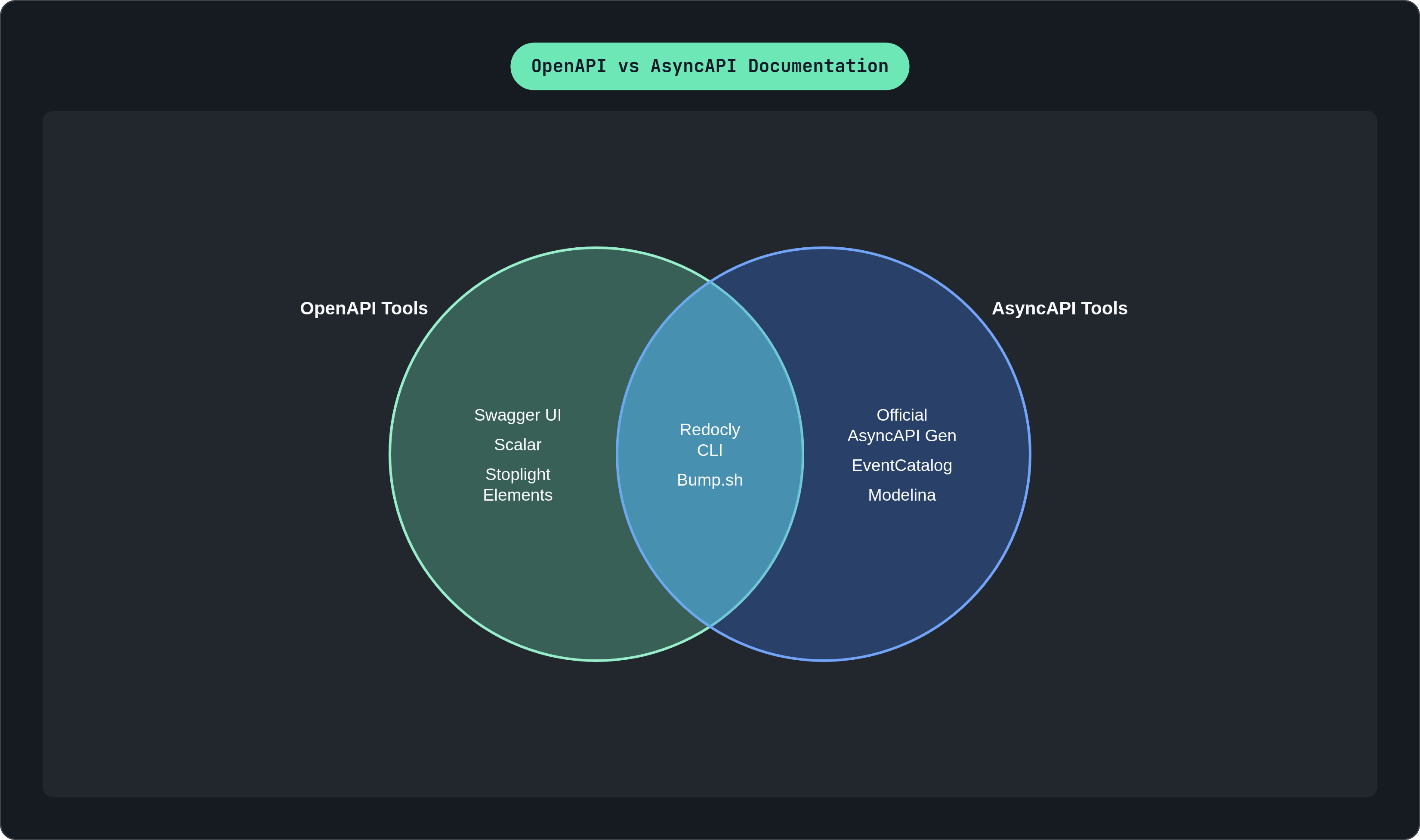
Here's where the two spec formats really diverge, and it's worth pausing on why. OpenAPI's world is paths and HTTP methods; AsyncAPI's world is channels, operations, and messages. The object models are different enough that a renderer built for one rarely does the other justice, which is why so few tools genuinely serve both well.
The practical gap runs deeper than the schema difference, too. Event-driven APIs ship without usable reference documentation far more often than REST APIs do. Walk into a typical Kafka-based service and what you'll usually find is an asyncapi.yaml sitting in a repo somewhere and a paragraph in a README. That's the whole artifact. Nobody wrote a reference doc because nobody built the equivalent of Swagger UI into their workflow for events the way they did for endpoints.
What a solid AsyncAPI generator closes is channel listings, message schemas, operation descriptions, and protocol details across WebSocket, Kafka, MQTT, and AMQP, enough that a developer can build a working consumer without going and reading the source code themselves. AsyncAPI documentation also carries an architecture dimension that OpenAPI docs rarely need to address, though: which services publish to which channels, how events actually flow across a system end to end. A reference doc listing message schemas doesn't answer that question on its own, and that gap is exactly what the next two tools are built to address, each at a different scale.
The official AsyncAPI Generator: what it produces and where it stops
The official generator is template-driven and runs through the AsyncAPI CLI, with two documentation templates available out of the box: an HTML template that builds a static site using the AsyncAPI React component, and a Markdown template meant for embedding in a repo or feeding into a static-site pipeline you already run.
Templates exist for code and configuration generation too, and custom templates are fully supported, so really it's an engine rather than a fixed output. The latest npm release sits at 3.4.0 and the project is actively maintained as of mid-2026.
One distinction worth being precise about: if your goal is generating models and classes for an event-driven application, the AsyncAPI team itself points you toward Modelina instead, a tool purpose-built for model generation. Don't confuse that job with documentation generation; they solve different problems even though they both read from the same spec format.
The limitation of the official generator is architectural, not a matter of missing features. It produces documentation artifacts, full stop. A browsable catalog spanning multiple services, architecture diagrams, or ownership maps are not part of what it produces. Teams running anything beyond a couple of event-driven services will hit that ceiling eventually and need something layered on top.
EventCatalog: when AsyncAPI documentation needs to show the whole system
EventCatalog starts from a different premise entirely: it ingests both AsyncAPI and OpenAPI specifications and builds a browsable catalog of events, channels, services, and domains, operating a level above endpoint-by-endpoint reference.
What comes out the other end includes architecture diagrams, ownership assignment per service, automatic versioning, and a visualizer that shows how services, channels, and messages actually relate to each other across the system. That last piece is the one most reference generators simply don't attempt. The real value proposition shows up for teams running both REST and event-driven APIs side by side: one catalog covering both spec types, instead of maintaining two entirely separate documentation systems that never talk to each other.
This fits platform engineering or architecture teams who need to answer "what publishes to this channel?" and "what consumes this event?" just as often as they need "what does this message schema actually look like?" The trade-off is honest and worth stating plainly: EventCatalog is an architecture catalog that happens to ingest specs, asking for more setup than a lightweight renderer you drop in over a weekend. It's overkill if you're running one or two AsyncAPI services and just need someone to be able to read the schema.
Which tool fits which team: a decision framework across the key variables
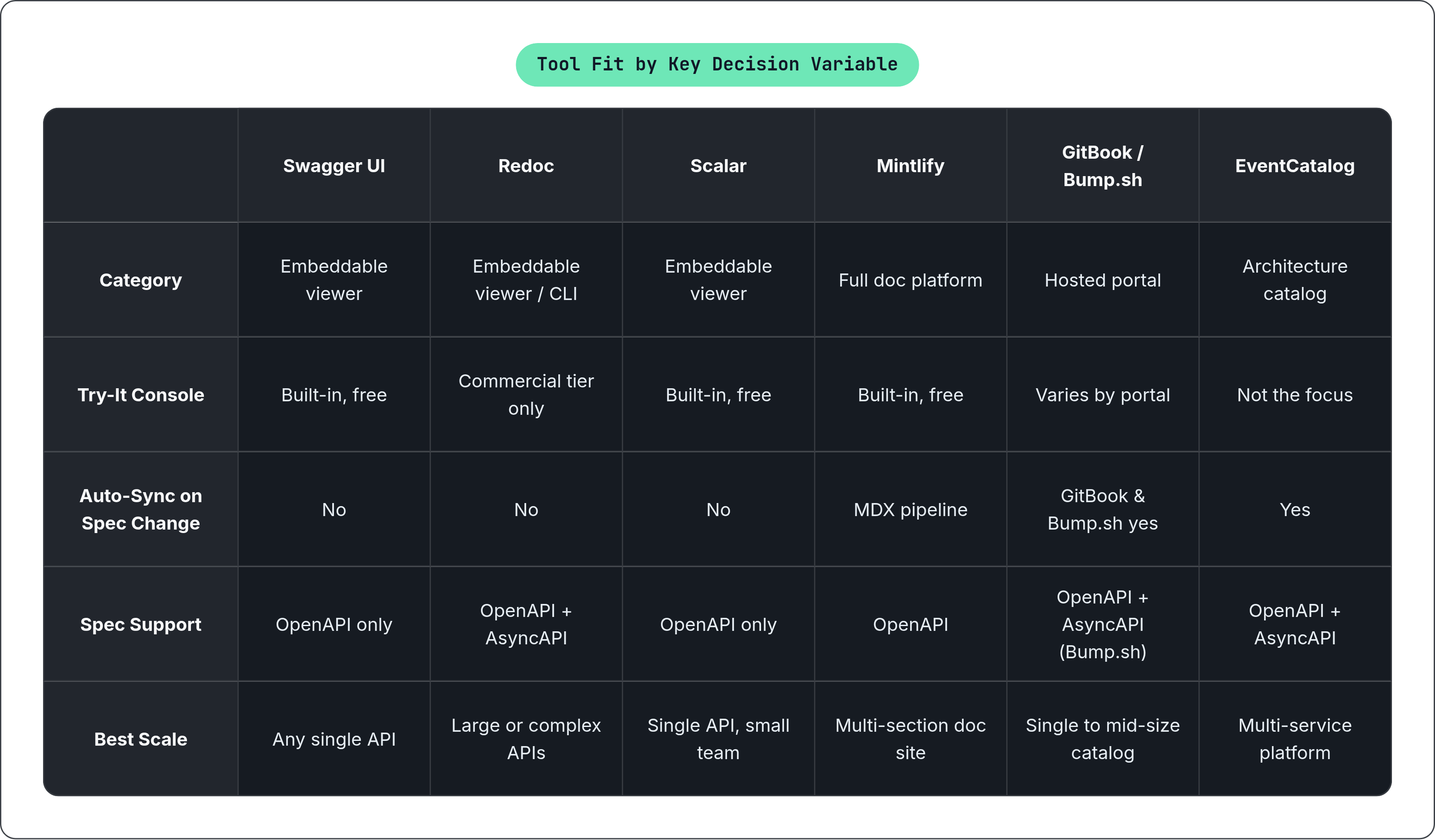
So how do you actually choose, given everything above? Break it down by what you're optimizing for, because no single tool wins on every axis at once.
On rendering needs: if you want interactivity and a try-it console in something you self-host, look at the newer embeddable viewers built around that experience. If you want a polished static reference with real customization depth for a large or complex API, the Redoc-style three-panel renderers are built for that. If maximum ecosystem compatibility and the widest developer recognition matter most, Swagger UI still earns its keep, dated UX and all.
On documentation strategy: if your reference needs to live inside guides, tutorials, and changelogs as one coherent system rather than a standalone artifact, a full documentation platform fits better than a standalone viewer. On update automation: if manual re-uploads are the drift risk you're trying to eliminate, prioritize tools with genuine sync, whether that's a computed-content hosted portal or a CI/CD-integrated CLI step running on every deploy.
On spec type: OpenAPI-only shops have the widest field to choose from. Teams running AsyncAPI, or both formats together, have a much narrower set of genuinely good options, and should weight that scarcity into the decision rather than assuming every tool that handles REST well will handle events with the same competence.
On scale: a single API with a small team barely needs more than a viewer and a place to host it. A platform team running dozens of services across REST and event-driven architecture needs a catalog, not a renderer, and pretending otherwise just delays the moment you have to rebuild your documentation approach from scratch.
This is less about finding the single best tool, since that tool doesn't exist independent of your infrastructure and your team's actual habits, and more about matching the shape of the tool to the shape of the problem you actually have, which is, admittedly, a less satisfying answer than a ranked list. But it's the honest one.