MCP Server Fundamentals for Documentation Teams
Learn how MCP makes your docs queryable by every AI agent simultaneously.
There is a version of this conversation I've had a dozen times, in various forms, usually in a Slack thread or a retrospective: a documentation team has spent months building an elegant, comprehensive docs site, only to watch an AI assistant confidently tell a developer something the docs explicitly contradict. The model wasn't ignoring the docs. It simply couldn't reach them.
That gap is the problem MCP is designed to close, and understanding why requires looking at the architecture, not just the tooling.
Anthropic introduced the Model Context Protocol in late 2024, created by David Soria Parra and Justin Spahr-Summers, as an open standard for connecting AI assistants to external data sources. The official documentation uses a USB-C analogy: a consistent connection interface so any AI system can plug into any data source the same way. Microsoft CTO Kevin Scott offered a different frame at Build 2025, calling it "the HTTP of the agentic web." Both analogies are reaching for the same idea. HTTP made it possible for any browser to read any webpage, regardless of what server software was running on the other end. MCP is attempting something structurally similar: making it possible for any compliant AI agent to query any compliant data source, without either side needing custom integration code. In December 2025, Anthropic donated MCP to the Agentic AI Foundation, a Linux Foundation directed fund co-founded by Anthropic, Block, and OpenAI. That governance move matters because it signals vendor-neutral shared infrastructure, not a proprietary Anthropic tool.
What it implies for documentation teams is worth sitting with. A docs site built to MCP compliance becomes queryable by every compliant AI agent, simultaneously, without any additional integration work per agent. That is a different category of capability than anything docs teams have had access to before.
The N×M Integration Problem MCP Eliminates
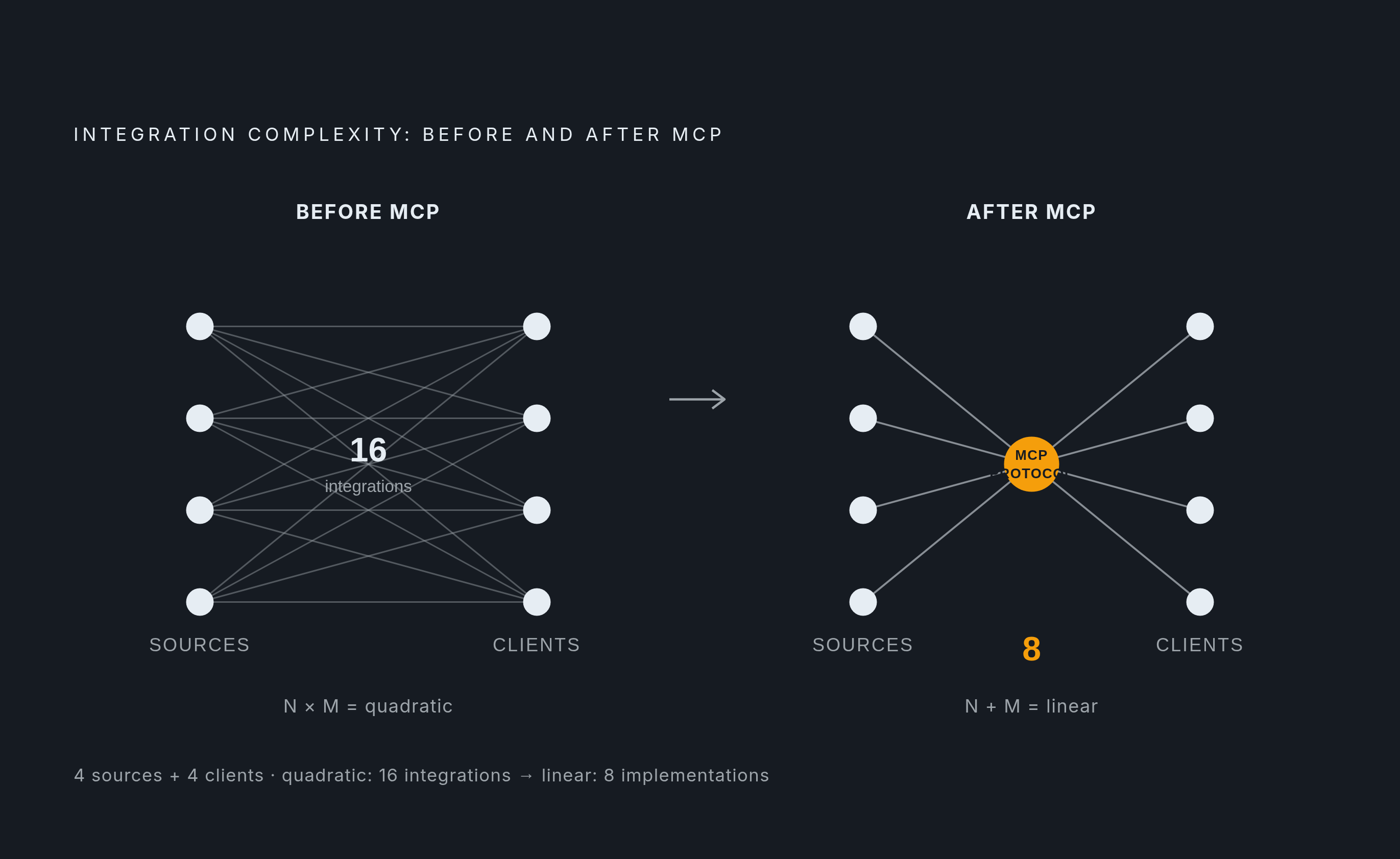
The cleanest way to understand what MCP solves is to map what it replaces.
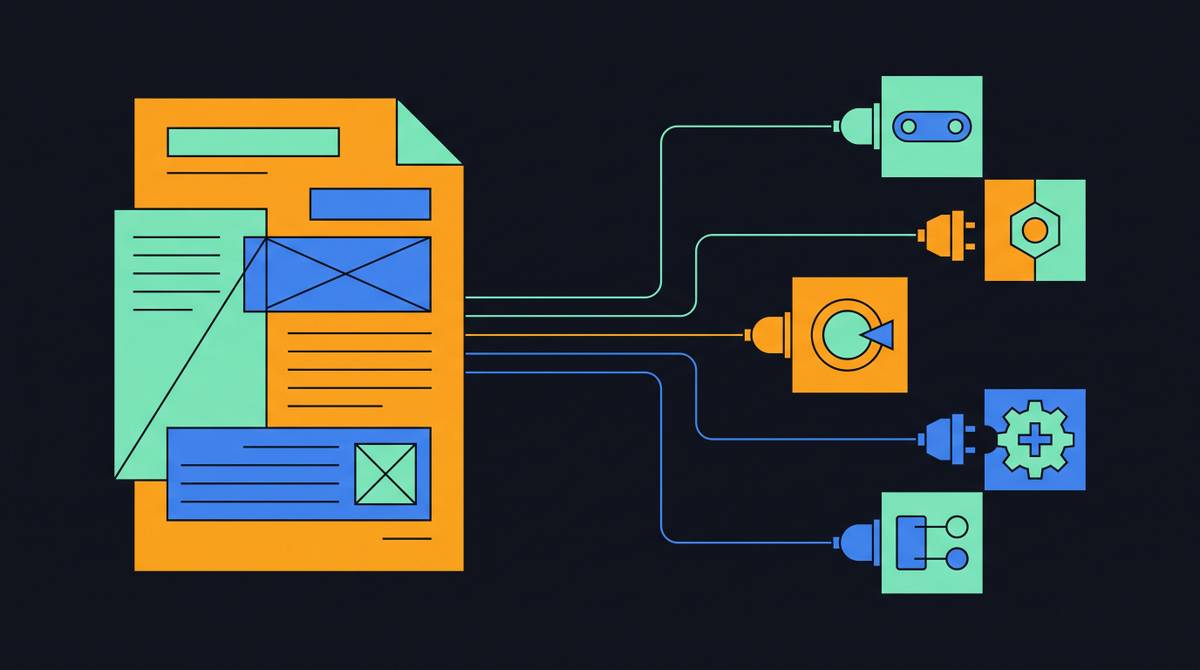
Before a shared protocol, every AI application that needed to access an external service had to build a custom integration with that service. Authentication logic, data formatting, error handling, retry behavior: all of it bespoke, all of it duplicated. If you had N external data sources and M AI clients, you were looking at N×M separate integrations. Each integration was its own maintenance burden. Each new AI client you wanted to support required another round of that work.
MCP requires each side to implement the protocol once. A data source becomes a compliant MCP server; an AI client becomes a compliant MCP host. After that, any compliant host can query any compliant server. The total integration count collapses from N×M to N+M, from quadratic growth to linear. Boston Consulting Group has described MCP as "a deceptively simple idea with outsized implications," noting that without it, integration complexity rises quadratically as AI agents spread through an organization.
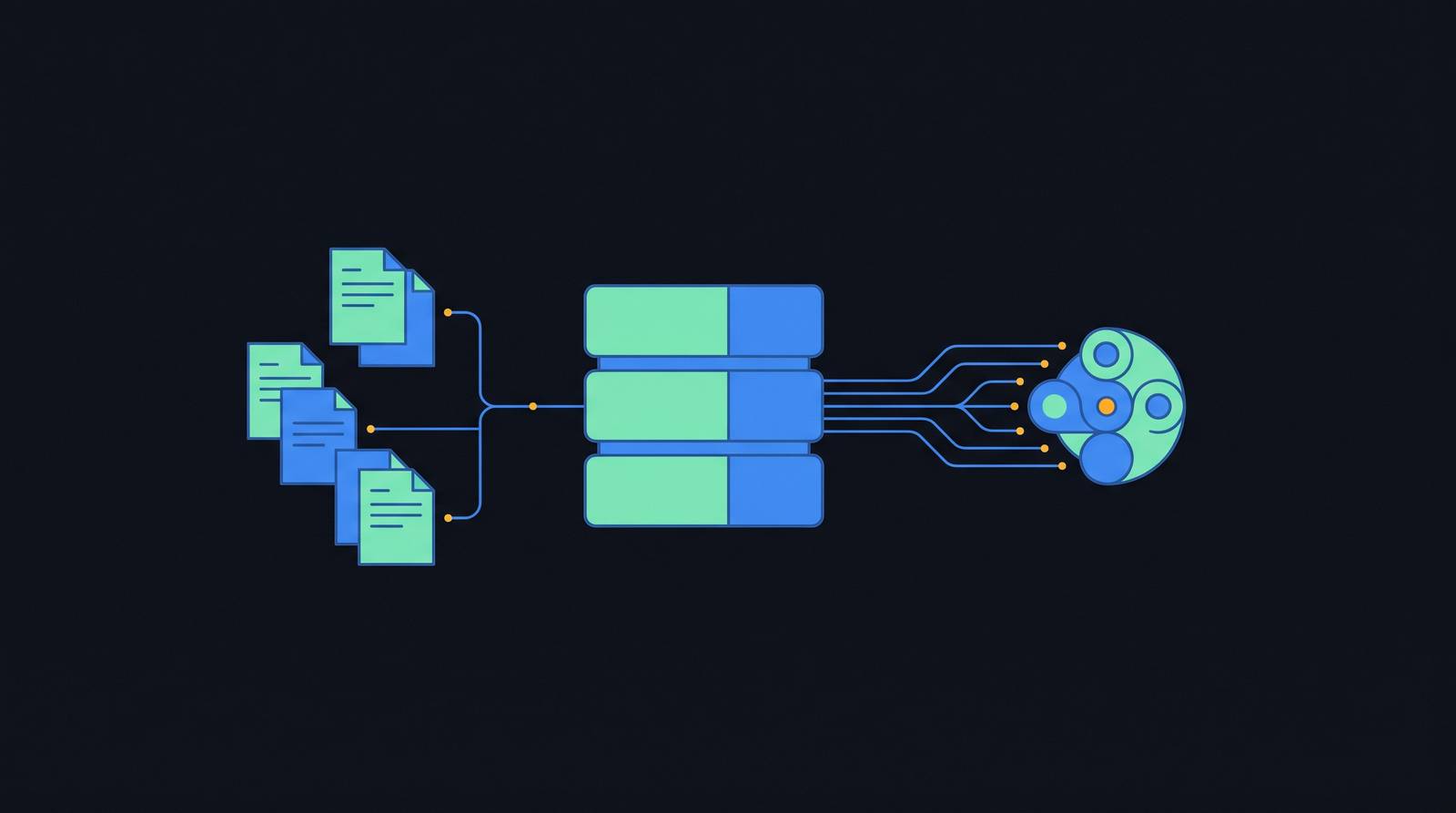
For documentation teams, the translation is direct. Instead of building one custom pipeline to feed docs into a particular AI assistant, another to feed them into a developer IDE, another to feed them into a support bot, a single MCP server makes those docs queryable by every compliant client at once. The architectural unlock here isn't a smarter AI; it's a standardized interface that makes existing knowledge reachable.
How the Three-Layer Architecture Distributes Responsibility
MCP defines three roles: host, client, and server. Each has a distinct job, and understanding the division is important for documentation teams deciding what they need to build versus what exists already.
The host is the container process: the environment where a user actually interacts with an AI. Claude Desktop is a host. Cursor is a host. An AI agent runtime running inside a company's internal tooling is a host. The host manages user authorization and consent, decides which clients can invoke which tools, and aggregates context across sessions so the underlying language model can maintain coherent multi-step workflows.
The client lives inside the host and maintains a one-to-one connection with a specific server. It formats requests, manages session state, and processes responses. It's the intermediary layer. Documentation teams rarely build or configure clients directly; clients are handled by whatever host software the end user is running.
The server is a lightweight, focused process that exposes a specific domain: a file system, a database, an API surface, a documentation site. It declares what it offers through a set of primitives. It enforces its own access constraints. Clients can only reach what the server authorizes. The server can run locally via standard input/output or remotely via HTTP, depending on deployment needs.
The key point for documentation teams is that the server is the piece they own. It is the interface between their content and every AI client that queries it. Building and maintaining that server is where the team's technical responsibility lives.
The Three Primitives a Documentation MCP Server Exposes
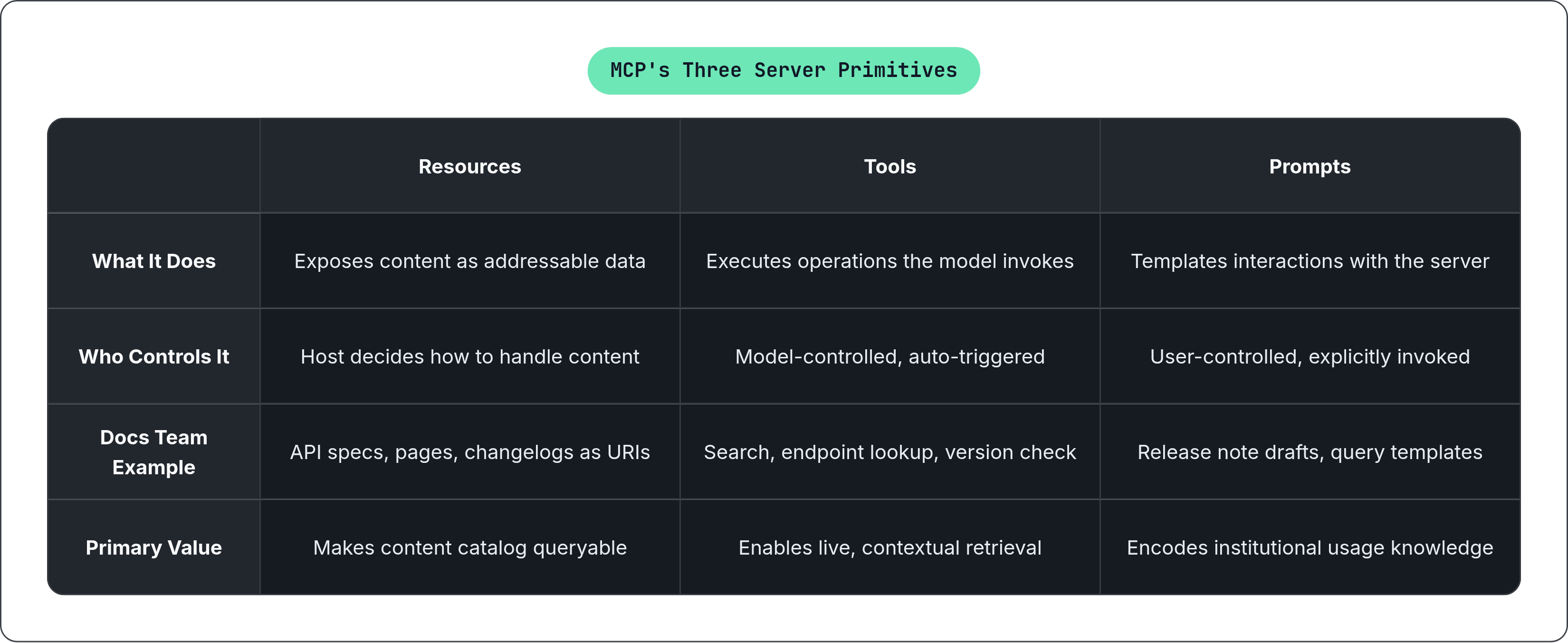
A compliant MCP server exposes its capabilities through three primitives: resources, tools, and prompts. Each does a fundamentally different job, and the distinctions matter when a documentation team is designing what their server should offer.
Resources
Resources expose content as addressable data. Each resource carries a unique URI and declares its MIME type. An individual documentation page might live at a URI like file:///docs/api-reference/endpoints.md; an OpenAPI spec might be exposed as a structured JSON resource. The host application decides what to do with the content once it retrieves it: pass it whole to the model, chunk it, or search it with embeddings.
For documentation teams, this is where the catalog of content becomes queryable infrastructure. Individual pages, API specifications, changelogs, glossaries, all become discrete addressable things rather than undifferentiated text on a static site.
Tools
Tools are executable operations the model can invoke automatically based on context and user intent. Each tool is defined with a name and a JSON Schema describing its inputs. They are model-controlled: the agent discovers available tools and calls them without explicit user instruction at each step.
Practical documentation examples include a tool that searches across all docs by keyword, a tool that retrieves the current specification for a specific API endpoint, or a tool that checks whether a parameter referenced in a query still exists in the current version. Tools may require user consent before execution, which is a meaningful safeguard for teams concerned about agents taking write actions on live content.
Prompts
Prompts are reusable, parameterized templates that define how to interact with the server's tools and resources. Unlike tools, which perform actions, prompts return structured context or instructions that guide the model's reasoning. They are user-controlled: explicitly invoked rather than auto-triggered.
The practical value is underappreciated. A well-designed prompt encodes institutional knowledge about how to use the server correctly. A user doesn't need to know the exact query structure for retrieving version-specific endpoint guidance; the prompt handles that. A writer generating a release note from a diff doesn't need to manually format the request; the prompt templates it. Prompts are, in a real sense, how a documentation team makes their server usable by people who didn't build it.
How Transport Choices Affect Documentation Deployments
MCP communicates through JSON-RPC messages, requests, responses, and notifications, transmitted over one of two main transport mechanisms.
Standard input/output (stdio) runs the server as a local process with no open network ports required. The lower attack surface is a real advantage in enterprise environments where documentation contains sensitive pre-release or internal content. Developer tooling, CLI-based integrations, and IDE-embedded agents like Cursor are natural fits for this transport.
Streamable HTTP, with optional server-sent events, enables remote access. When a documentation server needs to be queryable by multiple clients across teams or systems, including support bots, internal agents, and external developer tools, remote transport becomes necessary.
The practical decision tree for documentation teams is fairly clean. A single-team server used inside an IDE points toward stdio. A shared organizational knowledge server queried by agents across the company points toward HTTP. Teams building for both contexts may end up maintaining both configurations. The protocol is the same either way; only the transport changes.
How Fast MCP Has Moved From Experiment to Industry Infrastructure
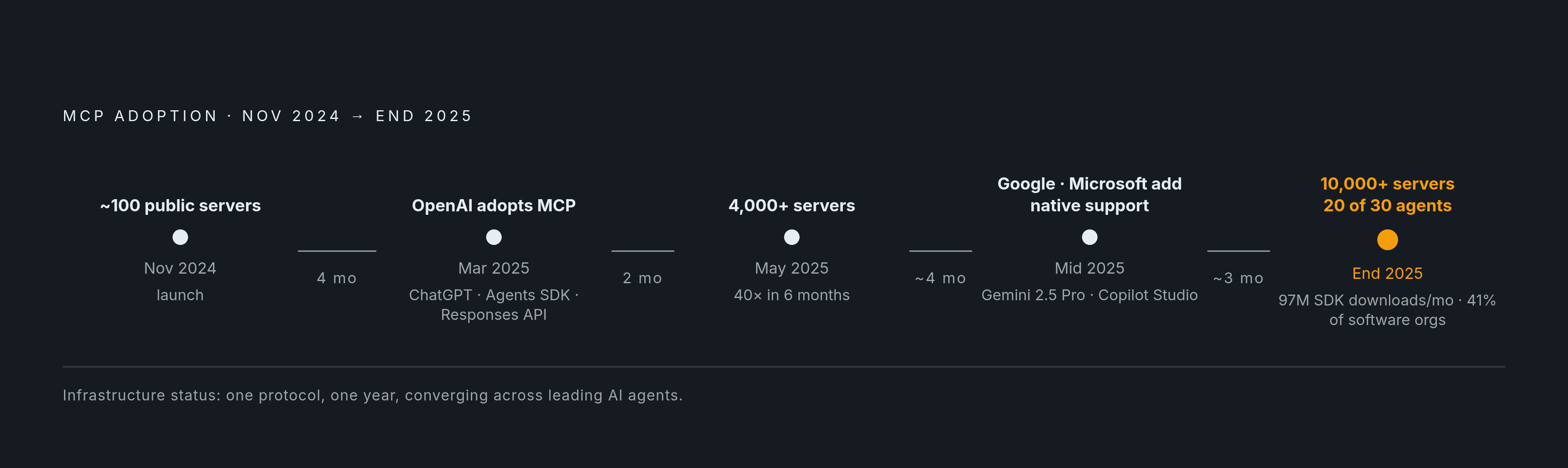
The adoption curve here is steep enough that it warrants careful attention, because the pace at which a protocol moves from experiment to infrastructure determines how much time teams have to evaluate it deliberately before it becomes a fait accompli.
Server counts grew from around 100 in November 2024 to over 4,000 by May 2025. By the end of that year, Anthropic's ecosystem data reported over 10,000 active public MCP servers and more than 97 million monthly SDK downloads. GitHub repositories related to MCP grew roughly 500% over a comparable period. Framework download numbers followed a similar trajectory.
Platform convergence accelerated the story. OpenAI adopted MCP in March 2025 across ChatGPT desktop, its Agents SDK, and Responses API. Google added native support in Gemini 2.5 Pro. Microsoft added support in Copilot Studio. Per the 2025 AI Agent Index, 20 of 30 leading AI agents now support MCP for tool integration. That is two-thirds of the field converging on one protocol within roughly a year of launch. And per the Stacklok 2026 software report, 41% of surveyed software organizations already run MCP servers in limited or broad production.
When the three dominant AI platforms and the majority of leading agents all implement the same protocol, the protocol is effectively infrastructure. This is how HTTP became infrastructure. Not through a standards committee decree, but through adoption density that made non-compliance increasingly costly.
What Happens to Documentation That Isn't Queryable When Agents Query Everything Else
This is the question I find most underexamined in conversations about agentic AI and documentation. The focus tends to land on what AI can do for documentation teams, when the more urgent question is what happens to documentation that AI can't reach.
The usage pattern is already established. Developers use AI coding assistants at high and growing rates, and a substantial portion of all code is now AI-generated or AI-assisted, according to data from Fern published in 2025. When a developer asks their assistant how to use an API, the assistant queries whatever sources it can reach. If your documentation isn't queryable infrastructure, it reaches something else: training data, a competitor's documentation, a hallucinated endpoint that never existed.
LLM hallucination, in this frame, isn't just a quality problem. It's an architectural problem. An agent confidently describing a deprecated configuration option is citing its training data, not your current documentation. The gap between what your product does and what AI agents tell users it does widens every time your documentation updates without reaching the models that users are querying.
Cherryleaf noted in October 2025 that improvements in documentation quality immediately translate into better AI responses, and that gaps or ambiguities surface directly in the AI's output. The inverse is equally true: your documentation quality now carries a multiplier effect on every AI interaction built on top of it. Static documentation doesn't just become less useful in this environment; it becomes actively misleading, because users are increasingly reaching your product through agents that are reasoning from whatever they can access.
MCP addresses this architecturally by grounding the agent in a live data source rather than training data. Correctness becomes a function of your documentation maintenance cadence, not of when the model was last trained.
The Documentation Workflows MCP Servers Make Practical
Several workflows that currently require significant coordination overhead become tractable with MCP infrastructure.
API documentation from live specifications becomes continuous rather than snapshot-based. An AI assistant connected to an OpenAPI definition via MCP can generate first-draft endpoint docs, write natural-language parameter descriptions, and produce sample code from the current spec. When the API changes, the server exposes the updated spec; the agent works from that, not from a cached version created at an earlier point in the release cycle.
Drift detection moves from a manual review process to a continuous automated one. An MCP-powered monitoring workflow can compare the current API implementation against published documentation and surface discrepancies, alerting when an API change has occurred but the documentation hasn't caught up, and suggesting what the update should say.
Knowledge gap analysis from support tickets becomes structurally available at scale. Connecting a support ticketing system and a knowledge base through MCP lets an agent identify questions the documentation doesn't answer, flag recurring gaps, and surface the raw ticket context for a writer to work from. The research overhead for reactive content updates drops considerably.
Release note automation moves from manually cross-referencing multiple systems to a prompt-driven workflow. Writers can direct an MCP-connected agent to draft, modify, or contextualize release note content based on a diff or changelog.
Research and drafting across internal repositories becomes possible within a single tool context. Writers configure MCP servers for internal systems alongside their documentation platform; a single prompt can draw across all of them without switching applications or manually copying context.
The Document360 data from 2026 found that over half of technical communicators already use AI regularly or semi-regularly in their workflows. These are extensions of existing practice, not a wholesale change in how documentation teams work.
Version Awareness and Governance That MCP Makes Structurally Possible
Two capabilities that documentation teams have historically treated as intractable infrastructure problems become structurally solvable with MCP.
The first is version-aware documentation. A documentation server can expose version-specific resources, so an agent querying on behalf of a user running a particular software version retrieves documentation for that version, not the latest. Troubleshooting steps, permission models, and configuration options adapt to the user's actual environment. The server carries that version context; the agent reasons from it. This is structurally impossible with a static documentation site. It requires queryable infrastructure with version as an explicit parameter.
The second is governance and auditability. Every tool call through an MCP server is traceable. The interaction log shows which resource was queried, by which client, when. AI-driven documentation workflows can meet the same auditability standards as manual processes. Access constraints are enforced at the server level: clients reach only what the server authorizes, and the host manages user consent. The governance model isn't a policy layered on top of the architecture; it's built into the architecture.
For enterprise documentation teams operating under strict content governance policies, this matters. The concern is often framed as "how do we let AI agents use our documentation without losing control of it." MCP's architecture makes that a solvable problem rather than a philosophical tension.
What MCP Servers Don't Handle and Where Documentation Team Judgment Still Lives
MCP servers define what an AI can access and do. They do not encode what the AI should write or how.
Style guides, terminology standards, structural conventions, voice and tone: none of that is expressed in a tool definition or a resource URI. An agent querying a documentation MCP server will produce content shaped by whatever writing standards it has been given separately. If none have been provided, it will produce generic, inconsistent output that reflects the model's defaults rather than the team's standards.
The practical implication is that MCP adoption requires a parallel investment in making writing standards machine-readable and explicitly available, whether through system prompts, style-layer instructions encoded in the host configuration, or some other mechanism the team controls. The server handles access and capability. The writing standards layer handles quality and consistency. Both are necessary; MCP handles only one of them.
There is also a deeper question about what MCP doesn't change, which is the work of deciding what documentation should exist, what user mental models it should address, and what problems it should solve. Those decisions require the kind of contextual judgment that comes from proximity to users and product, from reading support tickets and sitting in user interviews and understanding where understanding breaks down. An agent connected to a well-built MCP server can execute efficiently against a clear documentation strategy. It cannot replace the process of developing one.
The field is moving fast enough that the temptation is to treat MCP as a complete solution rather than an enabling layer. It's a meaningful enabling layer. The teams that will use it well are the ones that stay clear on what it solves and what it leaves squarely in their hands.