CI/CD Pipelines for Documentation Publishing
Automate documentation publishing with the same Git-based workflows your code already uses.

The phrase gets used loosely enough that it has started to mean whatever the speaker needs it to mean. So let's be precise. Docs as code means documentation is written in plain text, typically Markdown or reStructuredText, stored in a Git repository, and reviewed through pull requests. It does not mean documentation is written by engineers. It means documentation is managed with the same version control infrastructure as the rest of the project.
The co-location principle follows directly from that. When documentation lives in the same repository as the code it describes, a code change and its corresponding doc update travel together through the same review and merge process. The coupling is structural, not procedural. You cannot merge the code without also merging the docs, because they are the same commit.
Git as the backbone of documentation means something concrete: versioning, blame, branch history, and diff review on prose, not just on code. A writer can see exactly what changed between two versions of a page, who changed it, and why. Pull requests become the documentation review mechanism, the same tool the engineering team uses for every other artifact the project produces. Squarespace Engineering documented this effect when they opened their internal repositories to their full engineering organization; the review workflow transferred without friction because the tooling was already familiar.
Once documentation is in Git, every CI/CD trigger that fires on a code commit can fire on a doc commit. That is the hinge. Organizations including Google and Microsoft have standardized on this approach, as has the Write the Docs community, which has assembled substantial practitioner documentation around it. This is not an experimental posture; it is an established pattern that a significant portion of the industry has validated, stress-tested, and, in some cases, quietly abandoned and rebuilt from scratch after the first version got too complicated.
The four pipeline stages that turn a doc commit into a published page
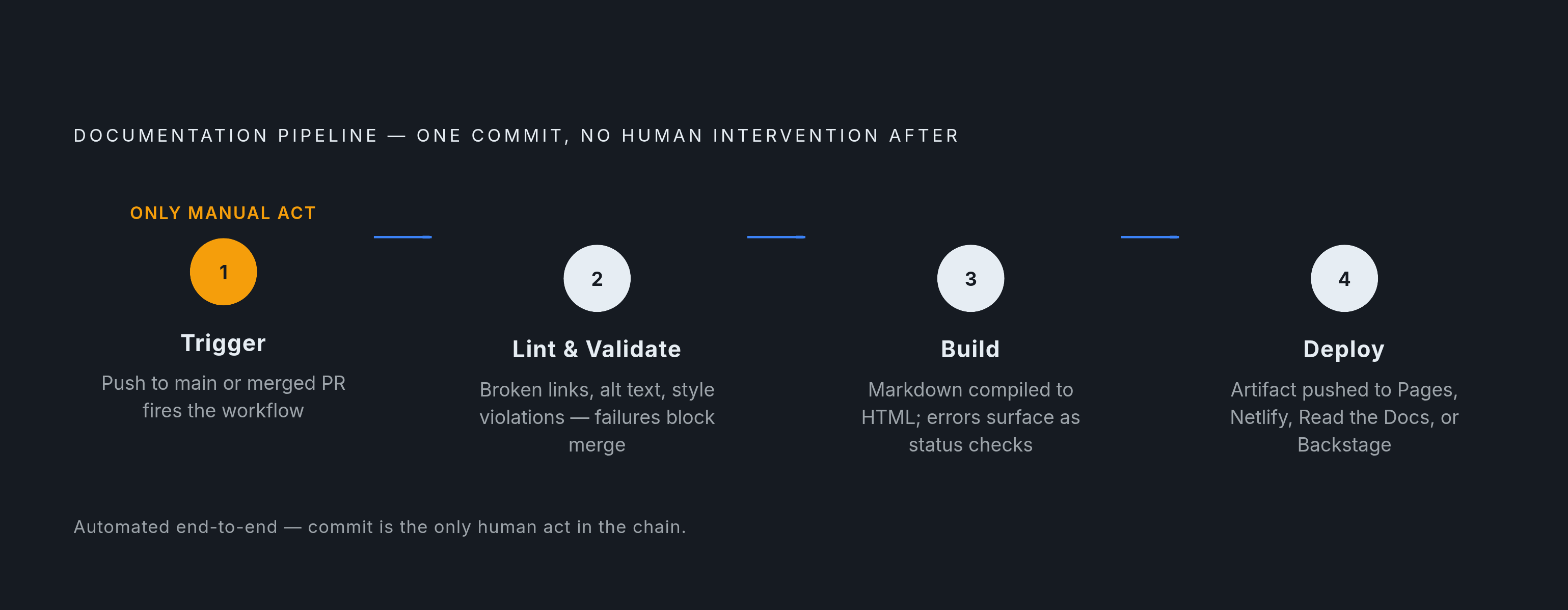
A documentation pipeline follows the same four-stage logic as a software pipeline: trigger, validate, build, deploy. Each stage has a clear responsibility, and together they compose a workflow that requires no human intervention after the initial commit. I want to walk through each stage not because the logic is obscure, but because the failure modes are specific, and knowing where things break determines how you build the thing in the first place.
Stage one: the trigger
A push to the main branch, or a merged pull request, fires the workflow. In GitHub Actions, this is declared in a YAML file that lives in the repository alongside the code and docs it orchestrates. The YAML file is itself version-controlled, which means changes to the pipeline are subject to the same review process as everything else. No one schedules a build; the commit is the signal. That sounds obvious until you've spent an afternoon trying to figure out why a documentation update from three weeks ago never actually published.
Stage two: lint and validate
Before anything is built, automated checks run against the proposed change. Broken links, missing image alt text, style violations, bare code fences without language tags: these are errors that a human reviewer might miss and that a reader will almost certainly notice. The pipeline catches them first.
The severity model here matters more than most teams initially appreciate. Treating every warning as a hard failure is a reliable way to erode writer trust in the system, sometimes permanently. Errors that affect the reader directly, a broken link, missing alt text, a malformed heading structure, fail the CI check and block the merge. Style suggestions, passive voice flags, sentence length advisories, post a comment and let the merge proceed. This mirrors the logic of a failing unit test: the pipeline stops when something is broken and annotates when something could be better.
Stage three: build
A static site generator compiles Markdown source into deployable HTML. MkDocs, Sphinx, Docusaurus, and Hugo all do this; each has different strengths covered in the toolchain section below. Build errors surface as GitHub status checks, visible inline in the pull request interface. Contributors do not need to install the toolchain locally to see whether their changes build correctly; the pipeline tells them. The ammaraskar/sphinx-action GitHub Action does exactly this for Sphinx projects. The build artifact is deterministic: the same source, built with the same toolchain version, produces the same output.
Stage four: deploy
The built artifact is pushed to its hosting target. GitHub Pages, Netlify, Read the Docs, and Backstage are all viable targets depending on organizational context. Squarespace Engineering's implementation is instructive: every merge to their main branch automatically updates their internal Backstage instance, so the team can trust that any documentation update is immediately reflected in a consistent, searchable location without a manual push or a deployment ticket.
Netlify's atomic deploy model solves a problem that is easy to underestimate. A traditional file-copy deploy can leave a site in a partially uploaded state if anything interrupts the transfer. Netlify's model does not make the new version public until the full upload is complete, meaning the URL reflects either the old version or the new one, not a mixture of both. This is the kind of detail that seems minor until a user hits a broken page mid-deploy and files a support ticket about it.
The quality gate layer: linting, link checking, and pre-commit hooks
Linting for documentation falls into two complementary categories, and both are necessary.
Prose linting, handled by tools like Vale, checks style, tone, and terminology consistency against a configurable rule set. Vale runs as a CLI command, which means it plugs into any CI environment without special integration work. Structural linting, handled by tools like markdownlint, checks formatting, heading hierarchy, and Markdown syntax. GitLab's own pipeline configuration recommends both Vale and markdownlint as a baseline, and their build pipelines enforce exactly this combination.
Link checking deserves its own place in the pipeline because it is a distinct failure mode. A link can be valid on the day a page is published and broken six months later when the target URL changes or disappears. Tools like lychee or markdownlint-cli can run as part of the CI pipeline on every commit and also as scheduled scans to catch links that rot after publication. The two use cases are different enough to warrant treating them separately; conflating them tends to mean neither gets done properly.
Pre-commit hooks change the feedback loop in a way that CI-only linting cannot replicate. When a writer pushes a commit, waits several minutes for the pipeline, discovers a linting error, and fixes it, the feedback is accurate but slow. The cycle erodes momentum and, more importantly, trains writers to think of linting as an external obstacle rather than an internal standard. Pre-commit hooks, implemented using the pre-commit framework with Vale and markdownlint adapters, catch violations at the moment of commit, before anything leaves the writer's machine. The closer the feedback is to the moment of writing, the more naturally it becomes part of the writing process rather than a separate audit. This is not a soft behavioral observation; it reflects the same feedback-loop logic that makes test-driven development defensible as an engineering practice.
GitLab's own documentation process offers a pattern worth borrowing: their CI jobs surface Vale warnings and errors directly into the merge request diff view, adjacent to the lines they reference, and language-specific Vale rule jobs only run when files in that language are modified. The second detail matters for repository performance. Running every check on every file on every commit accumulates into a real slowdown on larger documentation sets, and writers will start looking for ways around a pipeline that takes too long.
Versioned documentation as a pipeline output
When a project supports multiple active versions, version management becomes a pipeline responsibility, not a manual one. Users of version one and users of version two need documentation that matches their version. If the pipeline publishes only from the main branch, older users are perpetually reading documentation that describes something newer than what they have. I have watched this dynamic produce a specific kind of support ticket: the user is following the docs exactly, the docs are simply wrong for their version, and no one realizes this for several rounds of troubleshooting.
Docusaurus handles versioning through a dedicated version command that copies the current docs/ directory into a versioned snapshot. A version selector appears in the UI automatically. The mechanism is simple, but it shifts the versioning decision to the release workflow rather than to a documentation maintainer's calendar. Read the Docs takes a complementary approach: activating a version in the project settings triggers a build automatically, and users can navigate to the exact project version they are running.
The pipeline connection is a Git tag. Tagging a release in Git can trigger a docs build for that specific version tag, producing a versioned documentation artifact without any manual branch management. The tag is the signal; the pipeline does the rest.
Version sprawl is the failure mode that follows from versioning without a deprecation policy. Docusaurus's own documentation recommends keeping active versions well below ten; beyond that, the repository accumulates versioned content that nobody reads and that consumes CI time on every build. An explicit deprecation policy, automated where possible, is as much a part of the versioning architecture as the versioning tooling itself. This is the kind of maintenance decision that teams defer until the build times become embarrassing.
API documentation as the highest-value target for pipeline automation
API documentation degrades faster than any other category of technical content. Every endpoint change, every added parameter, every modified response schema creates a new opportunity for hand-maintained Markdown to be wrong by the following sprint. The surface area is large, the changes are frequent, and the errors are directly consequential: a developer reading a stale endpoint description writes code against an API that no longer behaves as documented. The feedback loop on this error is slow and expensive. They do not find out until something breaks in testing, or worse, in production.
The OpenAPI specification is the key point here. A complete OpenAPI 3.1 spec covers the bulk of what a typical API reference page contains: authentication, endpoints, parameters, request and response schemas. If the spec is current, the reference documentation can be generated from it rather than written by hand. That raises an important question: how do you ensure the spec stays current in the first place?
A blocking CI check on pull requests that touch API endpoints, not an advisory warning but a hard fail, is the mechanism that prevents the spec and the implementation from diverging. This is a stronger enforcement posture than most teams start with, and it produces proportionally stronger guarantees. The spec cannot fall behind by more than one merged PR.
The generation toolchain is well-populated. OpenAPI Generator handles multi-language output from an OpenAPI spec. TypeDoc generates reference documentation from TypeScript source. Sphinx autodoc covers Python projects. JSDoc covers JavaScript. Each can be wired into a GitHub Actions workflow to regenerate reference documentation on every relevant change. GitBook's computed content framework extends this further, automatically checking for OpenAPI spec updates on a schedule and reflecting changes in published documentation without requiring a manual trigger.
AI-assisted generation is entering this layer as a pipeline step, not just as a writing aid. A generation step can run on every PR that modifies API routes, compare the new output to the existing documentation, flag breaking changes, and automatically open a documentation PR or block the merge if a breaking change lacks a migration guide. The human role in this workflow shifts from writing repetitive reference content to reviewing and improving the reader experience. That shift is where human judgment adds the most value, and where, in my experience, most technical writers actually want to spend their time.
Choosing the right toolchain for a documentation pipeline
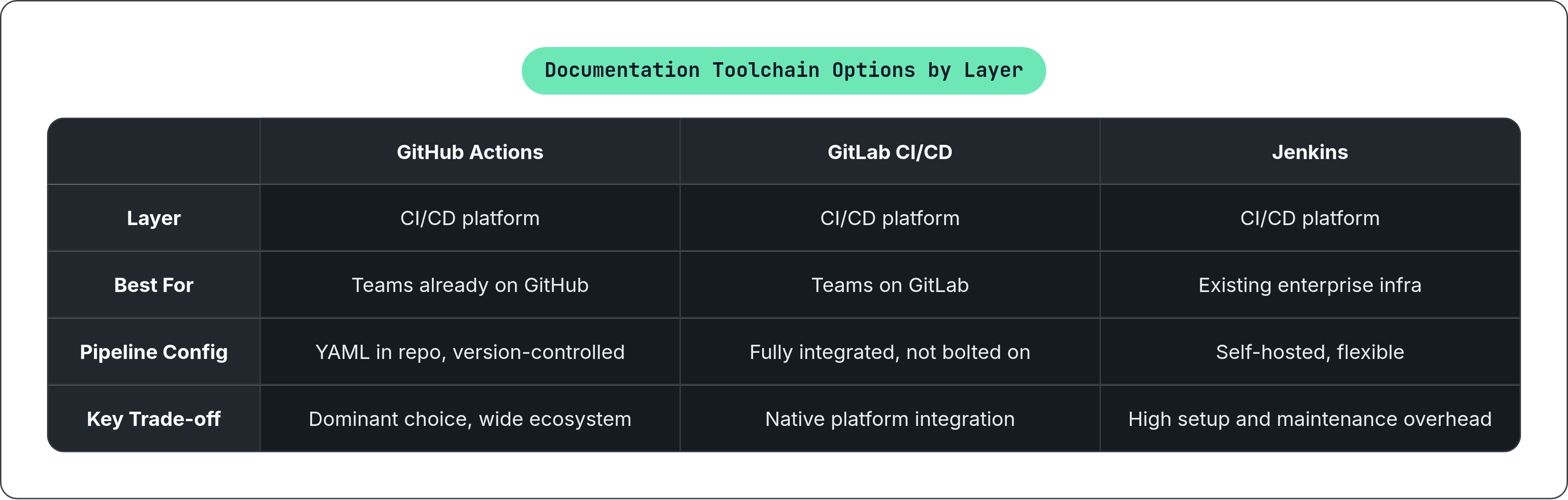
The stack has three layers: CI/CD platform, static site generator, and hosting. Choices in each layer constrain and enable choices in the others, sometimes in ways that only become visible after you've committed to a direction.
CI/CD platform
GitHub Actions is the dominant choice for documentation pipelines among teams already on GitHub. Workflow YAML files live in the repository alongside the code and docs, which means the pipeline configuration is subject to the same review process as everything else. GitLab CI/CD is the natural choice for teams whose source control is in GitLab; the pipeline is fully integrated into the platform rather than bolted on. Jenkins remains common in enterprise environments with existing Jenkins infrastructure. It is flexible and self-hosted, but the setup overhead is meaningfully higher than either cloud-native alternative, and the maintenance burden compounds over time in ways that are worth factoring into the initial decision.
Static site generator
MkDocs is fast, Markdown-native, and simple to configure. It requires a custom GitHub Actions workflow for GitHub Pages hosting because it has no native auto-deploy, but the workflow is straightforward to write and widely documented. Sphinx is the standard for Python project documentation, with deep integration into the Python ecosystem and robust support for autodoc-generated API references. The sphinx-action GitHub Action surfaces build errors directly as GitHub status checks.
Docusaurus handles the range from a single-page documentation site through a multi-version portal with search and navigation. It is backed by Meta, built on React, and includes a built-in versioning mechanism that integrates naturally with a tagging-based release workflow. Hugo has fast build times and scales well to large documentation sets. For teams shipping products where documentation needs to serve both human developers and AI agents, the distinction between a static publishing artifact and a queryable knowledge source matters increasingly, and it is a distinction that most of the static site generators listed above were not designed to address.
Hosting
GitHub Pages is free, tightly integrated with GitHub Actions, and serves static HTML from a branch. Netlify's atomic deploy model ensures the public URL does not reflect a partially uploaded state. Read the Docs expanded its generator support in 2025 beyond its original Sphinx focus to include MkDocs, Docusaurus, and others, and it brings built-in versioning, pull request previews, and integrated search. The key trade-off across all these options is how much pipeline YAML the team writes and maintains. Some combinations, such as Astro Starlight deployed on Netlify, require minimal configuration because the deploy is native. Others, such as MkDocs on GitHub Pages or Docusaurus on GitHub Pages, require a custom Actions workflow. The choice of hosting platform directly affects how much pipeline maintenance the team takes on, and that maintenance cost is real even when it is small.
Where documentation pipelines break down and how to prevent it
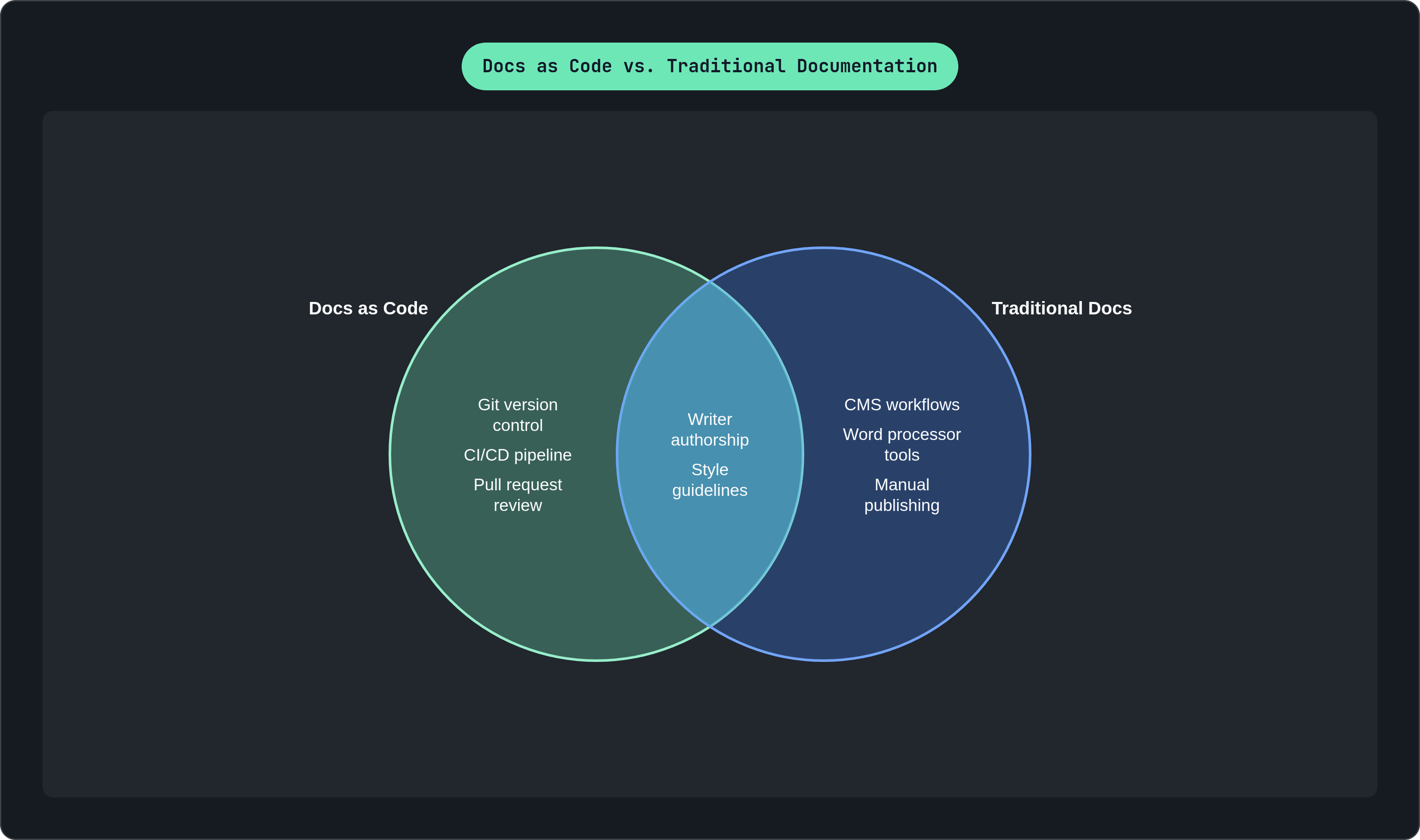
Tool complexity is the first barrier, and it is frequently underestimated by teams that build the pipeline rather than the teams that have to use it. Docs as code requires writers to be comfortable with Git, pull requests, and Markdown. For teams coming from CMS or word-processor workflows, that is a real learning curve. The mitigation is to resist the temptation to build the full pipeline from day one. A minimal pipeline, trigger, build, deploy, with no linting and no versioning, demonstrates value immediately and reduces the onboarding surface. Add complexity in layers after the baseline is trusted. This sounds obvious; it is also the advice most teams ignore.
Inconsistent linting results between local and CI environments are a known operational problem, particularly with Vale. Different versions installed locally versus in CI produce different results; a writer who fixes an error locally and then sees a different error in the pipeline quickly loses confidence in both. Pinning tool versions explicitly in CI configuration and in pre-commit hook definitions resolves this, but it requires intentional maintenance as tools release updates. Document the required local setup in the repository. This is not optional metadata; it is part of the pipeline contract.
The 2025 DORA State of AI-Assisted Software Development Report surfaced a finding that deserves attention from anyone adding AI generation steps to a documentation pipeline. Teams increasing AI adoption improved individual output and documentation quality, but delivery stability worsened: both Change Failure Rate and Deployment Rework Rate increased. The implication for documentation pipelines is specific. AI-generated documentation added to a pipeline needs the same validation gates as human-written content. Auto-generated docs that are wrong at scale are worse than no docs, because they carry the authority of having been published and the volume to make the errors hard to catch.
Version sprawl, without an explicit deprecation policy, fills repositories with versioned documentation that nobody reads and that consumes build time on every run. Set a maximum number of active versions and automate the removal of versions outside that window. The policy does not need to be sophisticated; it needs to exist and be enforced by the pipeline rather than by human memory, because human memory is exactly what failed in the first place.
There is also a ceiling on what a pipeline that publishes static HTML can accomplish. A CI/CD pipeline automates publishing reliably and well. It does not make documentation queryable by agents, integrable into AI workflows, or capable of serving as dynamic knowledge infrastructure. Teams shipping with agents need to evaluate whether their documentation toolchain is producing pages that humans read or knowledge sources that feed the intelligence powering the product. That distinction is becoming harder to defer, and the toolchain decisions made now will either support or constrain the answer.
What a documentation pipeline looks like when it is working
The operational reality, when the pipeline is functioning, is largely invisible. A developer merges a pull request. No one schedules a deployment, sends a Slack message, or updates a version number in a CMS. The pipeline fires, runs linting and link checks, builds the static site, and pushes the artifact to the hosting target. If anything fails, the merge is blocked or an advisory comment appears in the pull request. If everything passes, the new version of the documentation is live before the developer has moved on to the next task.
The value accumulates in the negative space: the support tickets that do not get filed, the onboarding sessions that do not get scheduled, the Slack messages that do not get sent because the docs actually reflect what the code does. Documentation stops lagging behind releases because it cannot lag behind releases; it ships with the code it describes, through the same pipeline, on the same trigger. The 2024 DORA State of DevOps Report finding returns here with some weight: organizations with high documentation quality were more than twice as likely to meet or exceed their organizational targets. Those organizations were not the ones with the best writers or the most documentation budget. They were, more often, the ones that had built systems where accurate, current documentation was the path of least resistance rather than an act of individual discipline.
The pipeline is not what produces good documentation. Writers still have to think clearly, structure arguments, and understand their audience. What the pipeline does is remove the specific, recurring failure mode where good documentation exists at the moment of writing and then silently becomes wrong. That is a narrower claim than it might appear, and it is also, in practice, the failure mode that does the most damage.