Semantic Search Optimization for Documentation Sites
Semantic search matches user intent, not just keywords, making docs findable for humans and AI.

Documentation search is a matching problem, and most doc sites still solve it with a matching tool built for a different job. A user types "printer won't connect" into a search bar; the doc that fixes their exact problem is titled "Installing the device driver." Keyword search sees zero shared words and returns nothing. This piece walks through why semantic search fixes that gap, what it takes to build it correctly, and why keeping it working over time is its own ongoing job.
How semantic search works, and why it fits documentation better than keyword matching
Text gets converted into numeric vectors called embeddings, and those vectors place similar meanings close together in a mathematical space. "Authentication error" and "login failing" end up near each other even though they don't share a single word. Relevance gets measured by cosine similarity, which is just the cosine of the angle between two vectors: a smaller angle means the query and the document are talking about the same thing, at least statistically.
Why does this map so well onto documentation? Because users don't search docs the way they search a product catalog. They type "how do I..." and "why is X not working," open-ended phrasing that shares meaning with a procedural how-to guide even when not a single word overlaps. Keyword search was never built to catch that. It was built to catch strings, not intent.
The stakes go up once retrieval-augmented generation enters the picture. AI assistants and in-product agents pull documentation into their answers by finding semantically similar chunks first, then generating a response from what they retrieve. Docs that aren't structured for semantic retrieval aren't just harder for humans to find. They're invisible to the AI layer entirely, which is arguably the bigger loss at this point.
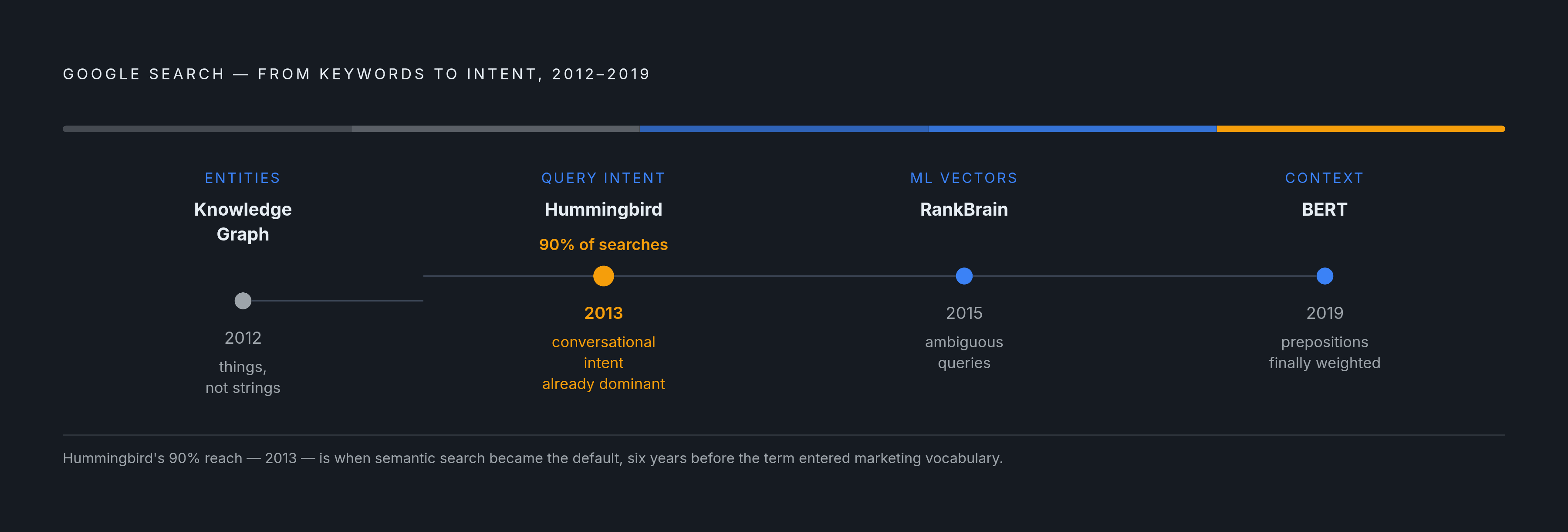
Google's own search history traces the same arc. Knowledge Graph landed in 2012, Hummingbird in 2013, RankBrain in 2015, BERT in 2019, and each one pushed ranking further from counting keywords toward parsing meaning and intent. Hummingbird alone affected up to 90% of searches at launch, an early signal that conversational intent was already replacing exact-match logic well before "semantic search" became a term marketers used. BERT went further still: it started weighing small function words and their placement, which is why a query like "2019 Brazil traveler to USA needs a visa" finally returned results for citizens of the traveler's home country rather than the reverse. One preposition, correctly weighted, changed which direction of travel the search engine understood.
For documentation teams, the payoff of getting this right isn't limited to one channel. The same semantic infrastructure that powers a public search engine also powers the in-product search bar and the RAG agent answering support questions. Structure the content well once, and all three benefit.
Why pure vector search is not enough for documentation, and where hybrid search comes in
Vector search has a specific blind spot: it loses precision on exact tokens. Error codes, API method names, config flags, CLI commands, part numbers, all of these need lexical, character-for-character matching, not conceptual proximity. A query like "how do I authenticate?" is a great candidate for semantic retrieval. A query for "ERR_SSL_PROTOCOL_ERROR" or "kubectl apply --dry-run" needs exact lexical matching instead; the user knows exactly what string they're looking for, and vector similarity can actually work against them here, raising the risk of conceptually related but literally wrong results appearing in the ranked output.
Documentation users bounce between both modes constantly, often in the same session. Someone reads a conceptual overview, then needs to look up one flag's exact syntax. Neither pure semantic search nor pure keyword search covers both needs well on its own.
That's the case for hybrid search: combine dense vector retrieval with BM25, the classic keyword scoring algorithm. The correct build keeps the original text fields intact for BM25 scoring, and separately copies that same content into a semantic field at indexing time, purpose-built for vector search. This isn't a patch bolted onto an existing pure-vector system after launch. It has to be part of the index design from the start.
That's also the direction the industry has actually moved in over the past couple of years: early pure-vector search products are giving way to hybrid architectures, because real query traffic simply doesn't split cleanly into "semantic" and "keyword" buckets. For a documentation site, this is a decision with consequences that reach well beyond engineering. It's a discoverability decision that determines what users can and can't find.
How content is chunked and embedded determines what semantic search can retrieve
Break a document into pieces for embedding, and each piece loses track of where it came from. A chunk pulled out of the middle of a long page doesn't know what section it belongs to or what page title framed it, and that missing context weakens the embedding itself, since the model has less signal to work with.
Splitting by document structure, meaning headings, sections, and procedural steps, produces chunks that map to actual concepts. Splitting by arbitrary token counts produces fragments that might straddle two unrelated ideas mid-sentence. Traditional RAG setups average around 100 words per chunk. That's fine-grained enough for precise retrieval, but it multiplies how many pieces the system has to search through, and it raises the odds that a single concept gets sliced across a chunk boundary. An overlap of 100 to 200 tokens between adjacent chunks helps guard against that.
Prepend a short header to each chunk before embedding it, one that names the topic and the section it lives in. It sounds small. It measurably improves retrieval quality anyway, because it restores some of the context that got stripped out during chunking.
There's also a mismatch in format between what documentation looks like and what a query looks like. Docs are long and structured; a user query is a handful of words, informal, sometimes half a sentence. An embedding model treats those as fairly different kinds of objects, and that difference hurts retrieval even when the underlying meaning lines up. Query rewriting is one answer: run the raw query through a lightweight LLM prompt that expands it into a longer, more descriptive version before it gets embedded, closing some of that format gap.
What does this mean for the person actually writing the docs? Page structure now determines readability and functions as the literal unit of retrieval. A page with clear headings and logically separated sections embeds better and surfaces more accurately than a dense, undivided wall of prose, even when the two pages contain the exact same information.
Structuring documentation as a topic graph, not a collection of standalone pages
Borrow the topic cluster model from content marketing and it fits documentation almost exactly. One pillar page covers a broad concept, say "Authentication," at a high level. Cluster pages branch off from it to handle specific subtopics: the OAuth2 flow, token expiry, SSO configuration. Pillar pages are meant to cover the concept thoroughly and link out to every cluster page they produce.
Why bother with this structure? Because it mirrors how AI search actually retrieves answers. These systems break a single user question into several sub-questions, a process sometimes called query fan-out, and a well-built topic cluster naturally has a dedicated page ready for each of those sub-questions rather than forcing one page to answer everything at once.
The broader direction of Google's recent core updates has emphasized thorough, consistent coverage of a subject as a meaningful ranking signal. Research cited by Search Engine Land found that content organized into clusters drives roughly 30% more organic traffic and holds its rankings considerably longer than standalone, unclustered pieces.
Internal links matter here, but so does something less visible: entity relationships. Each page should define one clear, primary concept, link out to related concepts, and use schema markup to tie itself to external knowledge graphs. Treat the documentation site as a small knowledge graph in its own right, not a flat folder of unrelated files.
That reframes how optimization itself should be approached. Instead of asking what keyword a page should rank for, ask what concept the page owns, and what other concepts it connects to. Coverage and connection determine how well semantic retrieval can make sense of a page, in place of keyword density. A documentation site where every API endpoint lives on its own isolated page, with no conceptual grouping tying it to anything else, is structurally hard for semantic retrieval to make sense of. Grouping by concept and linking by relationship is the actual fix, not just a nice-to-have.
Schema markup and structured data as the layer that makes documentation meaning machine-readable
Schema markup takes relationships that are implicit in the prose and makes them explicit for a machine. It's the difference between a search engine noticing that a page mentions "rate limiting" and a search engine knowing that this page is a TechArticle, that it belongs to a specific product, and that it answers a specific type of question.
A handful of schema types matter most for documentation: TechArticle, FAQPage, HowTo, and BreadcrumbList. Each one unlocks a different search result feature, rich snippets, People Also Ask boxes, step-by-step displays, that technical content is naturally suited for.
The sameAs property handles entity disambiguation: linking a page's core concept to its corresponding entry on Wikidata or another external knowledge graph confirms, unambiguously, which real-world concept the page is describing. Prose alone can't do that with the same certainty.
A common mistake: skipping schema because the content feels too technical or too niche to bother with structured data. That's backwards. Structured data is exactly what AI Overviews and other answer engines parse when they're deciding what to cite. Being cited in AI Overviews is increasingly understood as a discoverability advantage, making schema eligibility a practical concern rather than a theoretical one. Schema is part of what makes a page eligible to be cited in the first place.
Validate the markup before publishing, not after. An error in structured data means the machine-readable layer simply isn't there, no matter how well-written the surrounding prose is.
Search tooling options for documentation sites and what each trade-off means in practice
Algolia was built with developer docs, technical content, and API references specifically in mind. Its proprietary pipeline combines semantic vector retrieval and BM25 keyword scoring, with additional machine learning features trained across its broader customer base. Algolia also built DocSearch, a crawler paired with a search bar meant for structured documentation sites, and open-sourced it. The open-source repositories are now archived, since Algolia moved to a proprietary closed-source crawler back in February 2022 and no longer actively maintains the open-source version, though a legacy version is still available for anyone who wants to self-host it. Query latency in production is designed to be fast enough for interactive use. The trade-off is that the retrieval pipeline is proprietary, so there's less visibility into how ranking decisions get made, and pricing scales with usage.
Typesense is open-source and ships with built-in vector search using HNSW indexing, so semantic and hybrid queries work natively without standing up a separate vector database. It can auto-generate embeddings using built-in models like S-BERT and E-5, or route through external APIs like OpenAI or PaLM. Send it JSON, get hybrid semantic-plus-keyword search back, no extra plumbing required. Its Conversational Search feature runs a form of built-in RAG directly over a documentation corpus, accepting a question and returning a fully formed sentence answer. A maintained fork of Algolia's original open-source scraper, the Typesense DocSearch Scraper, indexes into Typesense and pairs with a front-end library called typesense-docsearch.js. Latency in production is similarly optimized for interactive query speeds. It's self-hosted by default, so infrastructure management lands on the documentation team rather than a vendor.
Meilisearch is written in Rust and stores data using LMDB, Lightning Memory-Mapped Database, which combines in-memory speed with data that persists to disk. It defaults to a single-node setup, optimized for fast, simple deployment, though horizontal scaling through sharding and replication is available in the Enterprise Edition and through Meilisearch Cloud. That single-node default suits small to medium documentation sites well. Scaling it horizontally takes more planning than a system like Elasticsearch, which was built for that scale from day one.
Elasticsearch can support a complete production-grade AI search setup on its own: index designs built for hybrid retrieval from the start, hybrid retrieval scored with reciprocal rank fusion (RRF), and automated workflows, all without bolting on an external orchestrator, a separate vector database, or a third-party embedding API account. The pattern for building this correctly keeps the original text fields intact for BM25, then uses copy_to at mapping time to populate a dedicated semantic_text field for vector search, the same hybrid design principle that shows up across every tool on this list, implemented at a different scale. The trade-off is real operational complexity, which makes Elasticsearch the right fit mainly for teams already running Elastic infrastructure or working at genuinely enterprise scale.
One thing cuts across all four options: for documentation feeding an AI agent or a RAG pipeline, whatever the search layer returns becomes the context window the agent reasons over. Tooling choice isn't just a human search-experience decision anymore. It directly shapes how good the agent's answers are. Whichever tool gets chosen, the underlying principle stays the same: documentation needs to feed directly into whatever intelligence layer sits on top of the product. Static docs sitting in a silo, disconnected from the search and agent layer, produce retrieval gaps that only get worse as the product keeps changing underneath them.
Keeping semantic coverage intact as documentation changes over time
Products change faster than docs get rewritten, and that gap is where semantic coverage quietly erodes. Documentation written for a previous version of a product uses vocabulary that no longer lines up with how users describe the current version's behavior. Nobody notices right away, because the search bar still returns something. It's just increasingly the wrong something, and the zero-result rate, the share of queries returning nothing relevant, climbs as this drift continues.
Embedding models drift too, in a related but distinct way. As the user base and the product's own vocabulary evolve, an embedding model that was trained or tuned against older documentation starts to misrepresent the current conceptual landscape, even if nobody touched the model itself.
Topic clusters need active maintenance, not just initial construction. Ship a new feature without updating the pillar page above it, and the new cluster page ends up with no canonical parent to link back to. Internal links go stale. The concept sits orphaned, cut off from whatever topical authority the rest of the cluster had built up.
Zero-result rate is the earliest warning sign worth watching. A rising share of queries returning nothing doesn't necessarily mean the search index needs a rebuild. More often it means the documentation itself has fallen behind what the product actually does now.
Structural discipline pays off here in a very practical way. Documentation written from the start with clear headings, one clearly owned concept per page, and schema markup in place is simply cheaper to update later. Unstructured prose has to be re-chunked and re-embedded almost from scratch after every meaningful revision, while well-structured content can be updated in place with far less rework.
The end goal is documentation that stays current as a baseline operating requirement. It's documentation that updates in lockstep with the product, treated as a reliability requirement for any AI system drawing on it as a knowledge source. Teams running AI agents in production carry a sharper version of this problem: stale documentation doesn't just leave a human reader with the wrong answer. It feeds outdated context into every single agent response that cites it. At that point documentation currency becomes a product quality question. It's a product quality question, and it behaves like one.