RAG Pipeline Architecture for Docusaurus and MkDocs
Preserve document structure from the start, or watch your RAG system degrade silently.
Large language models freeze at their training cutoff, but documentation changes weekly, sometimes daily. That gap is why retrieval-augmented generation exists for docs sites at all, and it's why building a RAG pipeline on Docusaurus or MkDocs content takes more than dropping pages into a vector database and hoping for the best. Every stage of the pipeline, from ingestion through generation, has to account for how these two frameworks actually structure content: Markdown syntax carrying semantic weight, sidebar trees encoding hierarchy, code blocks and tables and admonitions sitting on the same page. Get one stage wrong and the whole system degrades quietly, in ways that only surface when a user asks a question and gets a confident, wrong answer.
Documentation doesn't behave like other RAG source material, and treating it like a PDF or a generic web crawl is the first mistake worth naming. A PDF is static and flat. A database has a schema that tells you exactly what a field means. A web crawl is a pile of loosely related pages with no consistent structure. Docs sites built on Docusaurus or MkDocs sit somewhere else: authored in Markdown, so headings, nested lists, and fenced code blocks aren't just formatting, they're structural signals a parser can read directly. Mintlify, a knowledge infrastructure platform for dev teams and AI agents, is built on exactly this assumption about how structured documentation differs from generic web content. They're organized into a navigation tree with categories and subcategories, often several versions living side by side. A single page might hold a paragraph of prose, a YAML config block, a comparison table, and three annotated screenshots, each needing different handling. Run a generic crawler over that page the way you'd crawl a blog post, and it pulls the sidebar HTML, the footer, the version badge, and the actual content into one undifferentiated blob. That blob gets chunked and embedded as though it meant something, and the damage is done before anyone even picks an embedding model.
This piece walks through the five stages of a docs-focused RAG pipeline: ingestion, chunking, embedding, storage and retrieval, and generation. The idea running underneath all five is simple enough to state up front: Docusaurus and MkDocs hand you a strong structural signal for free, and each pipeline stage either keeps that signal or throws it away. Most teams throw it away. Not out of carelessness, usually, but because the tools they reach for first were built for blog posts and PDFs, not for a :::warning block sitting inside an H3 sitting inside a versioned sidebar tree.
The two-pipeline mental model every docs RAG system runs on
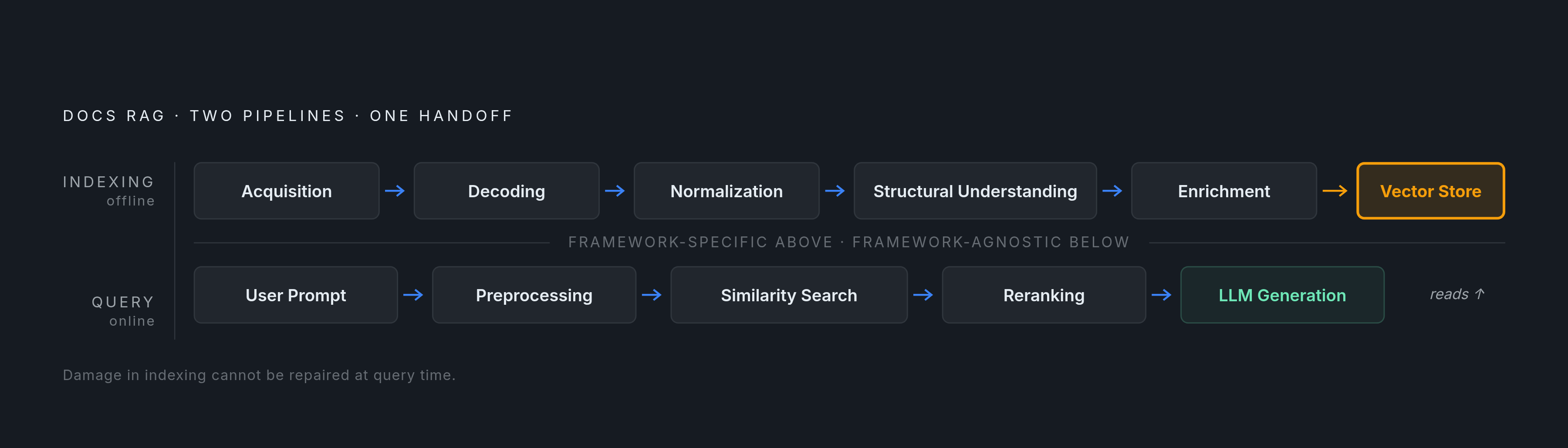
Split any working RAG system into two paths and the architecture starts to make sense. The indexing pipeline runs offline, whenever the underlying docs change, and turns raw pages into something a retrieval system can search. The query pipeline runs online, the moment a user asks a question, and turns that question into a grounded answer pulled from what indexing already built. Four pieces stretch across both: how documents split into chunks, which embedding model turns chunks into vectors, which vector database stores them, and the retrieval logic that connects a live query back to the right chunks.
Inside the indexing pipeline, docs-specific work happens in a fairly fixed order. Acquisition pulls the content, either from a crawl of the published site or straight from the GitHub repo behind it. Decoding turns Markdown or HTML into plain text plus whatever structured metadata survives. Normalization cleans up encoding issues and strips out UI chrome that snuck through. Structural understanding maps heading levels, lists, tables, and code fences so the chunker downstream has something real to work with. Enrichment tags each unit with metadata: page title, section path, last-modified date, doc version.
The query pipeline is shorter, and mostly doesn't care which platform generated the docs. A prompt comes in, gets preprocessed, triggers a similarity search against the vector store, results get reranked, and the LLM generates a response from whatever context survived that process. None of that logic cares whether the source was Docusaurus or MkDocs. The framework-specific decisions all live upstream, in indexing, which is exactly where most teams misplace their effort.
Here's the mistake worth naming directly: teams that blur the line between the two pipelines tend to try fixing a bad chunk or a missing metadata field at query time, tuning reranking weights or rewriting prompts, when the actual damage happened during indexing and no amount of query-side patching reaches back to undo it. The other version of the same mistake is throwing increasingly elaborate retrieval logic at what's really a parsing failure from stage one. RAG adoption among enterprises jumped from 31% in 2023 to 51% in 2024, according to Menlo Ventures, and most of that growth looks like teams moving out of notebooks and into production. That's exactly the point where the two-pipeline distinction stops being academic and starts deciding whether the system works at all.
Ingestion: extracting clean content from Docusaurus and MkDocs HTML
Chunking has a ceiling, and parse quality sets it. Hand the chunker a page where navigation links and footer text sit mixed in with the real content, and no amount of clever chunking logic downstream fixes that. This bites harder on documentation sites than almost anywhere else, because the UI chrome around the content, sidebars, breadcrumbs, version selectors, "edit this page" links, repeats densely across every single page.
Framework-aware ingestion tools handle this by recognizing what built the site in the first place. They detect Docusaurus, MkDocs, GitBook, ReadTheDocs, or Sphinx and apply selectors specific to that framework's HTML output, pulling only the documentation content and leaving sidebar and footer behind. A generic crawler has none of that awareness. It grabs the whole rendered page and dumps it into one text blob, noise included, and there's no cleanup step downstream that recovers what got lost here.
Two sourcing approaches exist, and they trade off in opposite directions. Crawling the published site is simpler to wire up and catches anything injected by JavaScript at render time, but needs selector tuning for whichever framework built the site. Pulling straight from the source repo, the raw Markdown files, gives a cleaner signal with zero UI chrome, since the structure sits explicit in the file syntax already. The cost is needing repo access and a Markdown parser instead of an HTML parser: a different problem, and usually a simpler one.
A handful of tools are built for exactly this stage. Firecrawl converts entire documentation sites into clean Markdown ready for chunking. Unstructured.io does element-level extraction, tagging content as Title, NarrativeText, Table, or Image, and covers formats well beyond docs sites. LlamaParse is cloud-hosted, handles complex layouts well, and also returns Markdown as output.
Whatever tool handles ingestion, the metadata captured here becomes a first-class retrieval signal later, not an afterthought bolted on at the end. Page title, the full section hierarchy path, last-modified date, doc version number, and any access-control tags for gated content, all of that carries forward. Normalization here also means deciding what to do with Docusaurus admonition syntax like :::note and :::warning: strip the wrapper, keep the text and its semantic weight intact. It means deciding whether code fences stay embedded in surrounding prose or get pulled out as their own units. And it means resolving relative links, since links that made sense inside the site's routing often break the moment content gets pulled out of context.
One more decision affects freshness directly. Pull-based ingestion, scheduled crawls, is easier to build but means the index is only as fresh as the last scheduled run. Push-based ingestion, webhooks or file-watchers on the source repo, catches changes, including deletions, close to the moment they happen. For docs that version often, that gap compounds fast.
Chunking: turning Markdown hierarchy into retrieval-ready units
Chunk size is probably the single highest-leverage setting in the whole pipeline. Cut chunks too small and a chunk loses the context that made it mean anything. Cut them too large and irrelevant tokens dilute the signal the embedding model is trying to capture, while also eating into the context window at generation time for no real benefit.
A 2026 benchmark from PremAI, run against the largest real-document test set available at the time, found that recursive character splitting at 512 tokens with 50 to 100 tokens of overlap scored 69% accuracy, beating out pricier alternatives. That's a reasonable starting default. But for content coming out of Markdown or HTML, the better approach flips the usual order: split on header boundaries first, then apply recursive splitting inside each section, rather than splitting recursively across the whole document and hoping headers land somewhere sensible.
Here's where most teams get chunking backwards, and it's worth stating plainly: token-count splitting should never run first on a Markdown document. Structural, header-based chunking builds a tree from the document's heading levels, H1 down through H3 and beyond, with paragraphs, lists, and code blocks hanging off that tree as leaf nodes. Chunks get cut at the logical Markdown boundaries this tree exposes, not at an arbitrary token count that might land mid-sentence. The parent heading path then gets prepended to each chunk's text, so a chunk living under "Authentication > OAuth2 > Refresh Tokens" carries that full path wherever it ends up in the vector store. That's what keeps the chunk interpretable on its own, independent of whatever sits next to it.
Skipping overlap between chunks is a common mistake, and an avoidable one. Even a modest modest overlap recovers context that would otherwise vanish right at the seam between two chunks, which is part of why 50 to 100 tokens of overlap shows up in the benchmark default above.
Different content types on the same page need different treatment, and lumping them under one chunking rule tends to hurt more than it helps. Code blocks often need larger chunks, sometimes a full function or a complete config file, because truncating code mid-block usually destroys its meaning outright. Tables should stay whole and get converted into Markdown table syntax so row-and-column relationships stay legible to the model; splitting a table across two chunks is close to useless. Admonition blocks, warnings, notes, tips, are usually small enough to keep intact as a single chunk, and the difference between "this is a warning" and "this is a tip" needs to stay visible in the chunk's text rather than getting stripped out during normalization.
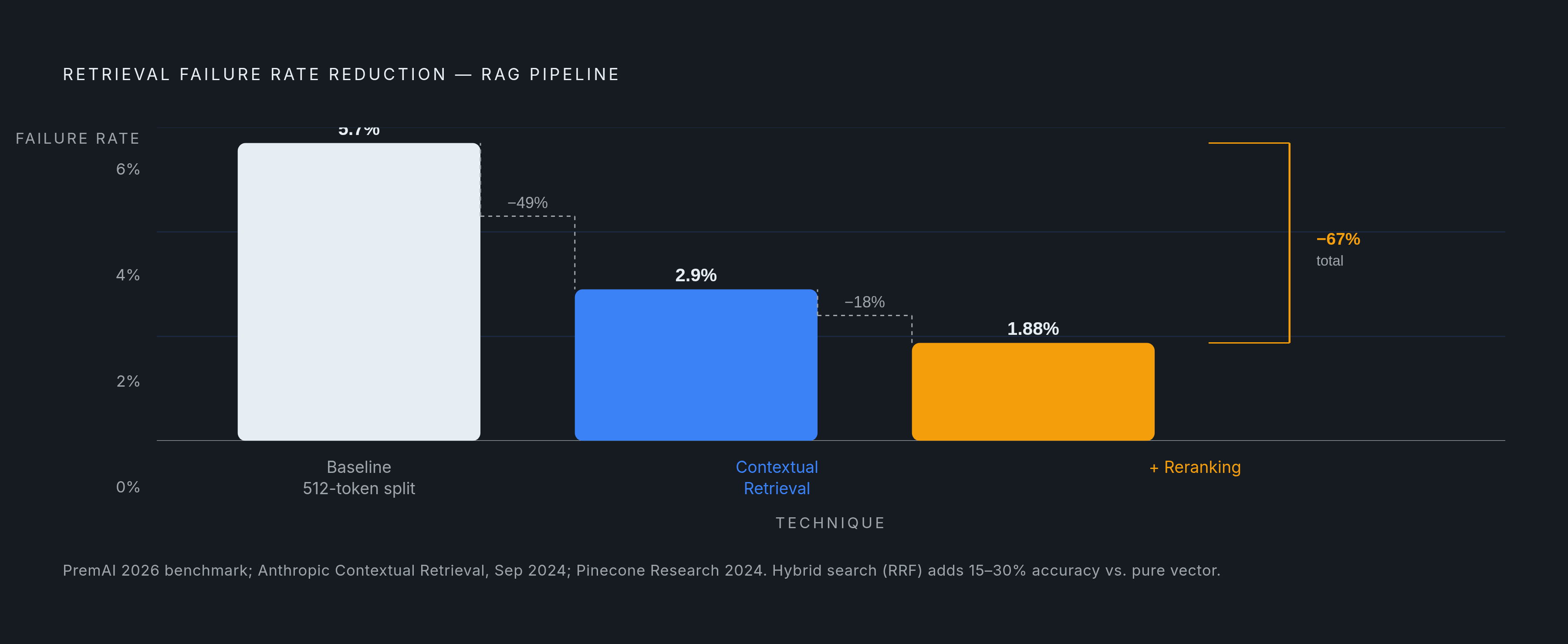
Two techniques from 2024 and 2025 push recall meaningfully past what standard chunking gets on its own. Anthropic's Contextual Retrieval, released in September 2024, prepends a one- or two-sentence summary of context to each chunk before it gets embedded and indexed for keyword search. In Anthropic's own evaluation, this cut the top-20 retrieval failure rate from 5.7% to 2.9%, a 49% reduction, and pairing it with reranking pushed that reduction to 67%. Late chunking takes a different route: it embeds the entire document first, using a long-context encoder, and only segments into chunks after embedding finishes. That order preserves cross-chunk context that gets lost when a local-window encoder embeds each chunk in isolation, which matters on long API reference pages where a parameter's meaning got established three paragraphs earlier and would otherwise disappear at the chunk boundary.
None of these defaults deserve treatment as gospel for a specific corpus. Chunk size and overlap need tuning against a golden set of real queries pulled from actual users of the specific docs site in question, not copied wholesale from a tutorial built on different content entirely.
Embedding: choosing and applying models to documentation content
Similarity means something different in a documentation corpus than in a general web corpus. Users searching docs type exact method names, specific error codes, precise product terms. Semantic closeness still matters, but exact lexical matches matter just as much, maybe more, and that changes which embedding approach actually makes sense.
Three families of models cover most of the ground. Dense bi-encoders, OpenAI's text-embedding-3-small, Cohere's embed-english-v3.0, open-source options like intfloat/e5-large-v2, encode each chunk into a single vector and compare it via cosine or dot-product similarity. This is the default for most documentation workloads. Sparse or learned-sparse models, SPLADE and various BM25 variants, are built for exact token matching, which makes them valuable for API documentation where a user types an exact method name or error string and expects it found verbatim. Retrieval-tuned open-source models like e5-large-v2 hold up well on technical text without the per-query API cost of a hosted model.
One real advantage of a well-built pipeline: the embedding model isn't welded to everything else. Loader, splitter, embedding model, and vector store can each swap out independently, a design principle LangChain has pushed specifically so teams can upgrade an embedding model later without tearing out the retrieval logic already built on top of it.
Screenshots and diagrams inside Docusaurus or MkDocs pages, architecture diagrams, annotated UI walkthroughs, deserve real attention instead of getting silently dropped, which is what happens by default in most pipelines. Kapa.ai, working with knowledge bases holding millions of images, found that describing each image once with a vision model at indexing time, then storing that description as an ordinary text chunk, let images get retrieved right alongside text at query time. The overhead ran small, between 1% and 6% per query, and the answer quality improvement was measurable. The same approach holds more broadly: describe images once at ingestion, store the description as its own chunk, retrieve it like any other chunk. The cost sits entirely at indexing time, a one-time expense, not something paid on every query. For docs sites full of UI walkthroughs and architecture diagrams, that turns what would otherwise be dead weight into retrievable content.
Metadata captured at the ingestion stage, section path, doc version, page title, should either get embedded directly alongside the chunk text or held as a separate filter field. Either approach enables version-scoped retrieval, so a query against v2 of the docs doesn't accidentally surface an answer written for v1.
Vector storage and hybrid retrieval for technical documentation queries
Pure vector search has a specific blind spot on documentation corpora: dense embeddings read semantic closeness well but miss exact strings, the SDK method name, the error code, the version number a user actually typed into the search box. Hybrid search closes that gap, and combining dense semantic retrieval with a sparse keyword method like BM25 or SPLADE has become close to the baseline expectation for production documentation RAG. Anyone still treating hybrid search as an optional upgrade is solving for the wrong failure mode.
Reciprocal Rank Fusion is the standard way to merge two ranked result lists into one. It computes a combined score from each document's inverse rank across both lists, so a document ranking highly on both dense and sparse search gets boosted, while a document strong on only one method, an exact keyword hit dense search missed entirely, still has a path to surface. Pinecone Research found in 2024 that RRF delivers 15 to 30% better retrieval accuracy than pure vector search alone.
On the storage side, Pinecone, Weaviate, Qdrant, Chroma, and pgvector are the names that come up most in documentation pipelines, and they differ on hosting model, filtering flexibility, and how natively they support hybrid search out of the box. Picking a store that handles both dense and sparse sides internally, OpenSearch is one option, Weaviate's built-in BM25-plus-vector hybrid is another, avoids the coordination overhead of running two separate retrieval systems and merging results by hand.
Scale is worth naming directly, since docs corpora covering many product versions get large fast: properly architected RAG pipelines scale to billions of vectors while keeping query times under 100 milliseconds. That's relevant headroom for any org with years of versioned documentation piling up in the background.
Metadata filtering is a retrieval lever specific to how documentation gets organized. Filtering by doc version, by product area, or by last-modified date before similarity search even runs cuts out noise from outdated or irrelevant sections, without touching the embeddings themselves at all.
Reranking sits right after retrieval and before generation. Cross-encoder rerankers score the query and each candidate document jointly, rather than encoding them independently the way bi-encoders do, and that joint scoring produces higher accuracy. It runs slower per comparison, but only against a small candidate set, the top 20 to 50 results hybrid search already narrowed things down to, so the latency cost stays bounded. Strung together, the improvement chain runs from structural chunking to hybrid search to reranking to whatever context compression happens before the prompt gets built, and each link trades a bit of latency for a bit of quality.
Generation: assembling context and prompting the LLM for documentation answers
Everything upstream, ingestion, chunking, embedding, retrieval, exists to hand the LLM a small, precise set of context at generation time. How that context gets assembled into the actual prompt still shapes the final answer more than most teams expect.
How many chunks to include is the first real decision, and it's a genuine trade-off: more context lowers hallucination risk but adds latency and cost, which is exactly why the reranking stage matters so much, since its whole job is making that included set as tight and relevant as possible before it ever reaches the prompt. Ordering matters too. LLMs do not weight all positions within a prompt equally, so placing the most relevant chunk closest to the actual question, rather than burying it earlier in the context block, tends to produce better answers. Whether to include a chunk's metadata, its section path, its page title, directly in the prompt deserves a deliberate decision rather than a default, since that context helps the model attribute its own answer correctly and gives the user something concrete to check the answer against.
Source attribution is arguably the entire point of building RAG over a docs site instead of just fine-tuning a model on the documentation. The promise RAG makes is that a user can trace an answer back to where it came from. A documentation assistant that generates a fluent paragraph with no link back to the page and section it drew from has quietly broken that promise, even when the answer happens to be correct. Surfacing the originating page and the specific section, not just the generated prose, is what makes the system verifiable rather than merely plausible. Verifiable is the entire reason to build this pipeline instead of just asking a general-purpose model and hoping it remembers the right version of the docs.