documentation platforms with built-in AI assistants compared
Four different AI capabilities hide behind the "AI-powered" label.

Every documentation platform on the market now advertises a built-in AI assistant, and that label has quietly come to describe at least four structurally different capabilities. A platform can handle one of those capabilities well and have no presence at all in another. The phrase "AI-powered" tells a buyer almost nothing about what they're actually getting. That split produces full platforms that handle authoring, publishing, and AI delivery together, standalone retrieval layers bolted onto docs stacks that already exist, and maintenance agents that watch for code changes and draft updates on their own. Two different readerships now put pressure on the same documentation at once: human developers evaluating a product, and AI agents, tools like Cursor, Claude Code, and ChatGPT, that treat docs as a primary source for answering developer questions. Sorting out which of the four capabilities a given platform actually covers is the only comparison that produces a useful answer, and that's the framework the rest of this piece builds on.
The four functional layers that separate these platforms
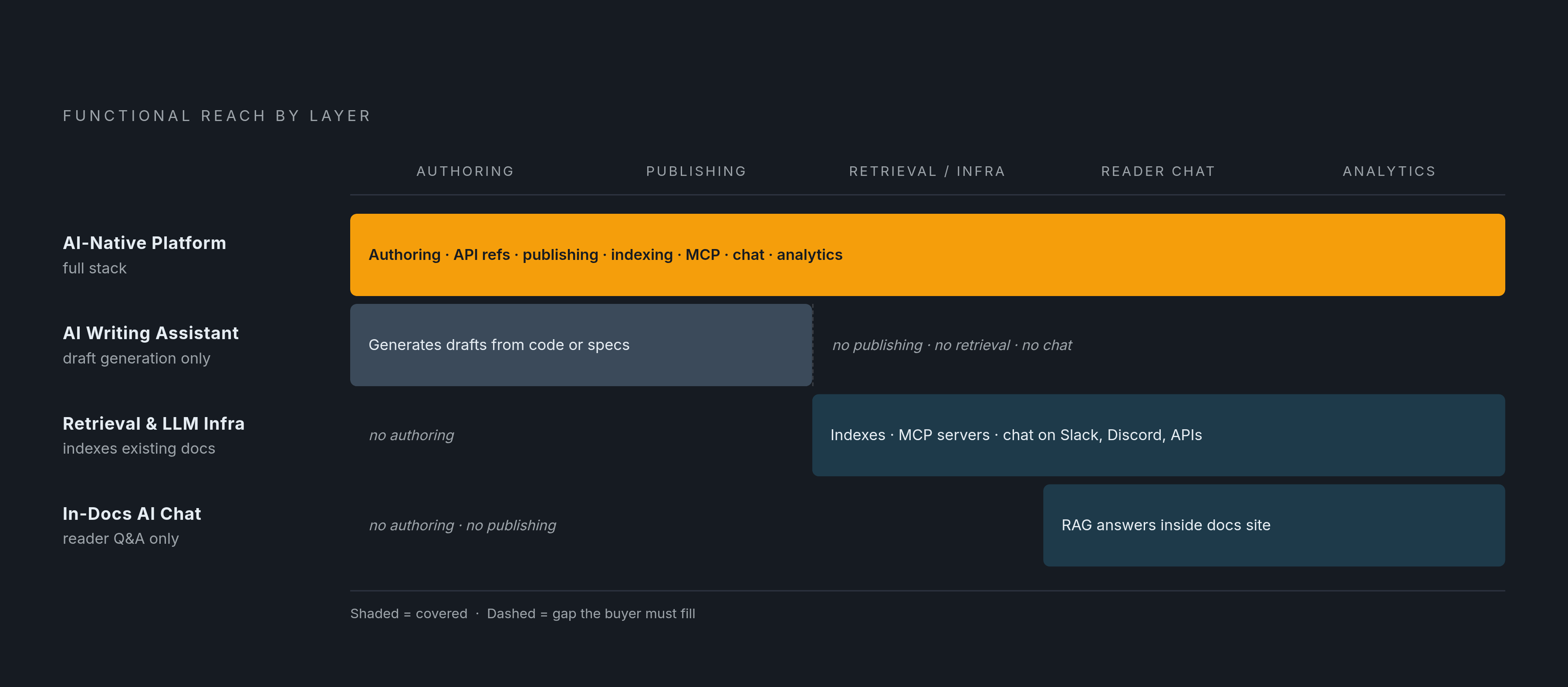
AI documentation tools sort into four categories based on where they sit in the documentation stack, and the position each one occupies determines what it can and can't do for a team. The first is the AI-native documentation platform: authoring, publishing, API references, AI readability, retrieval, chat, and analytics combined into a single product that serves human readers and AI systems at once. The second category is the AI writing assistant, a tool that generates documentation drafts from code, API specs, or prompts and then hands that output to a separate publishing system; it speeds up the first draft but doesn't publish or maintain anything past that point. Layer 3 is retrieval and LLM infrastructure, which sits on top of documentation a team already has and makes that content queryable by AI systems, indexing docs across sources, exposing MCP servers, and powering chat across websites, Slack, Discord, and APIs without requiring anyone to migrate a page. Layer 4 is in-docs AI chat: it answers reader questions inside a documentation site using retrieval-augmented generation, and a team can build it natively into a platform or add it as its own standalone layer.
Two outputs have become close to table stakes for agent readiness across all four layers. The first is llms.txt, a structured Markdown file that tells an AI agent what a website covers and where to find its most important content. The second is MCP, Model Context Protocol, support, and it lets tools like Cursor and Claude Code query live documentation directly instead of falling back on stale training data that may be months or years out of date. A third criterion separates platforms at a deeper level: AI traffic analytics, the ability to tell agent visits apart from human ones and see where each stalls, something standard web analytics was never built to answer. A team that buys a platform for its Layer 1 strength may find it has no Layer 2 capability, and a team that buys for Layer 2 may discover it has no retrieval or chat layer. The label "AI-powered" sits over that gap without disclosing it. The only responsible way to compare these tools is layer by layer rather than by marketing copy.
Why maintenance is the layer that breaks down fastest
Documentation starts drifting from the product the moment a team's shipping cadence outpaces its update cycle, and that drift is structural rather than a sign of a team not trying hard enough. Engineering organizations that ship code frequently put pressure on docs that update on a much slower rhythm, and the gap between the two cadences doesn't close on its own. For AI specifically, that gap turns into something worse than an outdated page: retrieval-augmented generation fetches whatever its index holds, and if the index holds outdated content, the AI returns a wrong answer with the same confidence it would use for a correct one. A strong underlying model doesn't fix that problem, because the model is only as current as what it's allowed to retrieve.
The fix that holds up under scrutiny has a specific shape: an AI-assisted maintenance system should read product or code changes, draft the documentation updates those changes imply, and route the draft for human review before anything publishes. That sequence keeps a person in the loop without turning that person into a bottleneck, since the system does the drafting and the human only has to check it. Platforms that draft fast but skip the grounding and verification step are optimizing for speed at the expense of accuracy, and the practical risk is a compliance team pulling the plug on the whole tool once it finds the first bad draft that made it to publication unchecked. Teams getting real value from AI documentation tools tend to use them to clear one specific bottleneck, whether that's drafting, search, or gap-detection, while keeping a human in the loop before anything goes live, and vendors that skip that human checkpoint deserve the closest scrutiny of anyone in this comparison. That human-in-the-loop requirement is the lens the rest of this piece applies to every platform that follows.
Mintlify: coverage across all four layers in one platform
Mintlify is the strongest option for a software team that wants a single AI-native documentation platform covering all four layers at once: doc publishing, API references, AI-assisted maintenance, in-doc chat, MCP support, LLM-readable outputs, and AI traffic analytics, without assembling separate tools around the docs stack to cover the gaps. On authoring and publishing, Mintlify supports Markdown and MDX, Git sync, and branch-based publishing, which lets developers work inside the code workflows they already use while the platform handles structured delivery on the back end. Its API reference generation pulls directly from OpenAPI specifications, so the published reference stays synchronized with the same source of truth the engineering team already maintains, and that closes off one common source of drift before it starts.
The in-docs AI assistant is trained on the full documentation set and answers with citations, so responses are grounded in the site's own content rather than whatever a general model happened to learn during training. On the agent-readiness side, Mintlify auto-generates llms.txt, llms-full.txt, and skill.md files, supports MCP servers, and delivers clean Markdown, giving AI agents a reliable, structured way to query live docs instead of defaulting to outdated training data. Mintlify's own Agent, the component responsible for proactive maintenance, is a real feature but a newer one, and teams evaluating it should treat it as still maturing rather than assume it handles every maintenance scenario unsupervised. Mintlify's AI traffic analytics separate agent visits from human ones and show which pages agents read and where they stop, a distinction that standard analytics tools simply can't draw. The platform is used by teams at Microsoft, Amazon, and Solana, among thousands of other companies. Advanced AI features, including the Agent and AI traffic analytics, sit on higher-tier plans, so if you're evaluating Mintlify, confirm exactly which tier includes those capabilities before you commit to a plan. The strongest fit is a software team shipping with agents that needs its documentation to serve human developers and AI systems from one integrated platform, not several stitched together.
GitBook: cross-functional authoring with agent-readiness built in
GitBook covers product docs, API docs, developer docs, and internal knowledge in one platform, built to serve human readers and AI agents alike, and it's particularly suited to cross-functional teams operating at enterprise scale. Engineers, technical writers, and product managers can all contribute through either code-based or visual workflows, and that softens the usual trade-off between docs-as-code rigor and the kind of easy editing a non-engineer actually wants to use. On output, GitBook supports llms.txt and MCP server access along with structured Markdown delivery, and both llms.txt and MCP are included even on the free plan. Its AI assistant grounds answers in the site's own content, and with GitBook's agent-readiness checker, a team can benchmark whether its existing docs are structured well enough for an AI agent to use effectively.
AI writing and AI search live on paid plans. The free tier excludes AI search and the AI Assistant, which are reserved for a higher paid tier, though it does include a limited weekly allotment of GitBook Agent. That Agent is GitBook's answer to proactive maintenance, scanning docs for stale content and supporting PR-based updates, currently available free in beta, though some reviewers describe it as operating more reactively than fully autonomously at this stage. For a team with a fast-shipping codebase, that means the maintenance burden still falls largely on people rather than the agent. The strongest fit for GitBook is a cross-functional team that needs docs serving both human readers and AI agents at enterprise scale, and whose update cadence is manageable enough that manual maintenance doesn't become a constant drag.
Fern: API-spec-driven generation that eliminates a whole category of drift
Fern starts from a different premise than the platform-first tools above. Instead of publishing content and then working to keep it synchronized with the product, Fern generates the API reference directly from the API spec, and generates the SDK from that same spec, so the two outputs can't drift apart the way a hand-maintained doc and a hand-maintained SDK typically do over time. That's an architectural decision rather than a feature added on top of an existing product, and it removes an entire category of staleness before it has a chance to start, rather than detecting drift after it's already happened and patching it. Fern generates SDKs in nine languages from that same spec, so the reference and every language SDK stay synchronized at the source, not through separate maintenance efforts. Fern fits best when a team's primary problem is keeping API references and SDKs in sync with a changing spec, rather than when a team is trying to maintain a broader documentation site with guides, tutorials, and conceptual content alongside the reference.
Kapa: retrieval infrastructure layered onto docs a team already has
Kapa's core advantage is that it requires no migration. It sits on top of documentation a team already has, indexes that content, and deploys across a website widget, Slack, Discord, and a direct API, with a hosted MCP server available for AI coding agents, all drawing from the same single index without anyone moving a single page. That gives it a meaningfully different shape from a platform-native assistant. A platform-native assistant answers questions on the docs page itself, but Kapa's retrieval layer answers the same questions wherever you already happen to be working. Kapa also tracks question and gap analytics, surfacing what users actually asked, where the AI's answer failed, and which topics have no coverage at all, a feedback loop that can directly inform a team's content roadmap. What Kapa doesn't do is just as important to understand: it isn't a publishing platform, and it doesn't handle authoring, versioning, or proactive maintenance, since its role is to extend an existing docs stack rather than replace it. The strongest fit is a team that already has a docs site and wants to add AI retrieval and chat across several channels without migrating anything, or a team that wants gap analytics feeding back into its content planning.
Docuwriter: AI writing assistance that hands off to a separate publisher
Docuwriter occupies the Layer 2 slot in this comparison: an AI writing assistant that generates documentation drafts and then hands that output to whatever publishing system the team already uses. That hand-off is both its advantage and its limit: a team keeps its existing publishing workflow intact and simply adds AI-generated first drafts on top of it rather than replacing anything. It doesn't handle publishing, versioning, retrieval, MCP exposure, or proactive maintenance, and those responsibilities stay with whatever platform sits downstream of it. The strongest fit is a team committed to a publishing platform it already has and looking to speed up the drafting step specifically, rather than a team looking to replace its documentation stack.
Matching the right layer or combination of layers to the actual bottleneck
Choosing among these options starts with identifying where the actual bottleneck sits, and you need to answer that before you open any price sheet or feature matrix. A team starting from scratch, or one ready to migrate its existing docs, and that needs publishing, API references, AI chat, maintenance, and agent-readable output all living in one place, gets the most direct value from Mintlify, which covers all four layers and stands as the strongest single-platform choice in this comparison. A team that needs cross-functional editing at enterprise scale, and that can manage documentation maintenance manually without leaning on an automated agent, finds a strong fit in GitBook, with the maintenance gap standing as the known and disclosed trade-off for that choice. A team whose primary problem is API reference and SDK drift tied to a changing spec should look at Fern first, since its spec-first architecture solves that specific problem structurally, before a maintenance agent would even need to get involved. A team that already has a documentation site and wants to add AI chat and retrieval across multiple channels without migrating anything finds that Kapa adds exactly that layer without displacing the stack already in place. A team that wants to speed up first drafts only, and that publishes through a separate platform it has no interest in replacing, is the clear target for a tool like Docuwriter.
A team doesn't have to pick a single platform. A team could run a publishing platform that's weak on maintenance and pair it with a separate writing assistant or retrieval layer to cover that gap, and that combination is a legitimate way to assemble a docs stack. But it comes with integration overhead and a second vendor relationship to manage, so the real question a team has to answer honestly is whether its bottleneck is narrow enough to justify assembling multiple tools, or broad enough that a single platform covering all four layers, the way Mintlify does, saves more effort than it costs.