Building a RAG Pipeline Over Documentation with LangChain
Balancing chunk size and loader choice determines whether your documentation RAG actually works.
Retrieval-augmented generation over documentation lives or dies on decisions most teams don't even realize they're making. This piece walks through building that pipeline with LangChain, stage by stage, from loading files to constructing the final prompt, and it takes a stance at each stage instead of pretending every option is equally defensible. Some of those stances will annoy people who already shipped the alternative.
Standalone language models fail against documentation in a specific, predictable way: their training data freezes at a cutoff date, but documentation changes on every release cycle. Ask a model unaided about a function signature that shipped last month, and it answers confidently anyway, borrowing whatever it remembers from a similar-sounding function buried somewhere in its training corpus. That's not a minor accuracy problem. It's structural, and RAG fixes it by grounding the model's output in text retrieved right now instead of text memorized months or years ago. Enterprises have noticed: RAG adoption jumped from 31% of enterprises in 2023 to 51% in 2024, and documentation Q&A tends to be one of the first use cases teams actually ship. But adoption isn't success. A meaningful share, somewhere in the 40% to 60% range by most industry accounts, never reaches production, and retrieval quality gets blamed more than anything else does. The question this piece sits with isn't whether to build a documentation RAG pipeline. It's where the wrong decisions get baked in early, quietly, and never get caught until a user asks the one question that exposes them.
What LangChain provides and why it maps cleanly onto the RAG problem
LangChain is a framework for wiring language models to outside data and chaining together the steps that turn a question into a grounded answer. That's the whole premise of RAG, so the fit isn't coincidental. It's the reason the framework exists in something close to its current form. The project hit its 1.0 release in October 2025, and one of the bigger shifts in that release was dropping LangChain Expression Language as the primary interface in favor of a create_agent abstraction built on top of LangGraph.
Sit with that for a second. This isn't a framework still finding its footing. It spans over 600 integrations and a single interface across more than 80 model providers, and by some accounts roughly 35% of Fortune 500 companies run it somewhere in production.
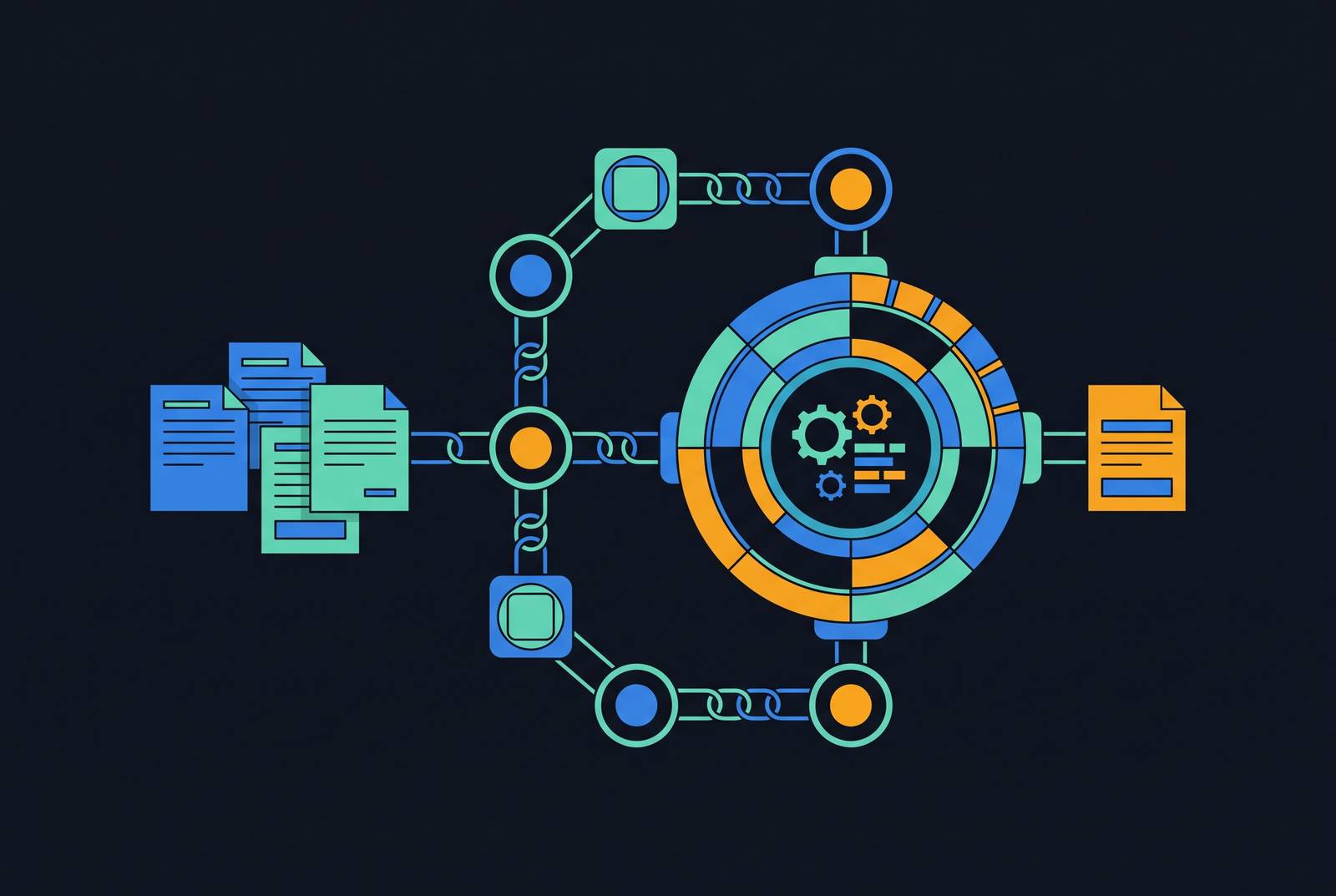
What makes it useful for this specific task is that it breaks a RAG pipeline into six distinct pieces: Loader, Splitter, Embeddings, Vector Store, Retriever, Chain. Those aren't arbitrary labels bolted on after the fact. They map onto the six things that actually have to happen for retrieval to work, and because each one is a swappable piece, a team can trade ChromaDB for Pinecone or swap an OpenAI embedding model for something running locally without touching the rest of the code. That matters more than it sounds like it should, because documentation pipelines tend to change vendors as they scale, and rewriting a retrieval chain from scratch every time a team outgrows its vector store wastes a week nobody has.
Two more pieces of the ecosystem are worth knowing before writing any code. LangSmith, which reached general availability in February 2024 after a closed beta the previous July, shows what the retriever is actually doing at each step, which becomes essential the moment a pipeline stops behaving the way the demo suggested it would. LangGraph Platform, generally available since May 14, 2025, is where a pipeline goes once it needs to grow from a straight retrieve-then-generate chain into something with branching logic or multiple agents.
None of that is required to get a basic system running, though. A working end-to-end documentation RAG pipeline (load, split, embed, store, retrieve, generate) fits in under 50 lines of code. Keep that number in mind. The complexity here was never about the plumbing being hard to write. It's about the decisions at each stage that decide whether the plumbing produces answers anyone can trust.
Loading documentation into the pipeline with the right loader
Loading is the least glamorous stage, and also the one that quietly decides what's even possible later. LangChain ships over 200 document loaders, covering file formats like PDF, HTML, Markdown, CSV, and JSON, plus loaders for pulling content out of GitHub repos, Notion workspaces, Google Drive, and Slack. For documentation specifically, a handful do most of the work: TextLoader for plain text files, PyPDFLoader for PDFs (it pulls text page by page and keeps the page number as metadata, which matters more than it sounds like it should), WebBaseLoader for scraping hosted docs sites via BeautifulSoup, DirectoryLoader for pointing at a folder and letting it sort out which sub-loader each file needs, and the Markdown-specific loaders that carry real weight for teams running docs-as-code workflows, where the source of truth is a folder of .md files sitting in a repository.
Every one of these loaders, regardless of source format, produces the same standard output: a Document object holding raw text plus a metadata dictionary (page number, source URL, file path, whatever the loader can pull out). That metadata isn't decoration. It becomes filterable at retrieval time, and throwing it away at the loading stage means it's gone for good. A team that loads documentation without keeping section headers or version tags has made a decision, whether or not anyone frames it that way, and it costs them later when they try to filter results by product version and find nothing left to filter on.
Memory handling is a smaller but real concern once a corpus grows past a few hundred documents. The .load() method pulls everything into memory at once: fine for a demo, painful for a large corpus. .lazy_load() processes documents one at a time instead, and that difference is the kind of thing nobody notices until someone tries to index an entire documentation site and watches the process crawl, or just die.
One caution worth stating plainly, because it trips up anyone working from an older tutorial: the langchain-community package, which historically held a lot of these loaders, was archived and isn't maintained anymore. Check whether the loader being copied has since moved to langchain-core or a first-party package. Community loader code that worked two years ago might quietly be running against dead code today.
Chunking strategy is where documentation RAG is won or lost
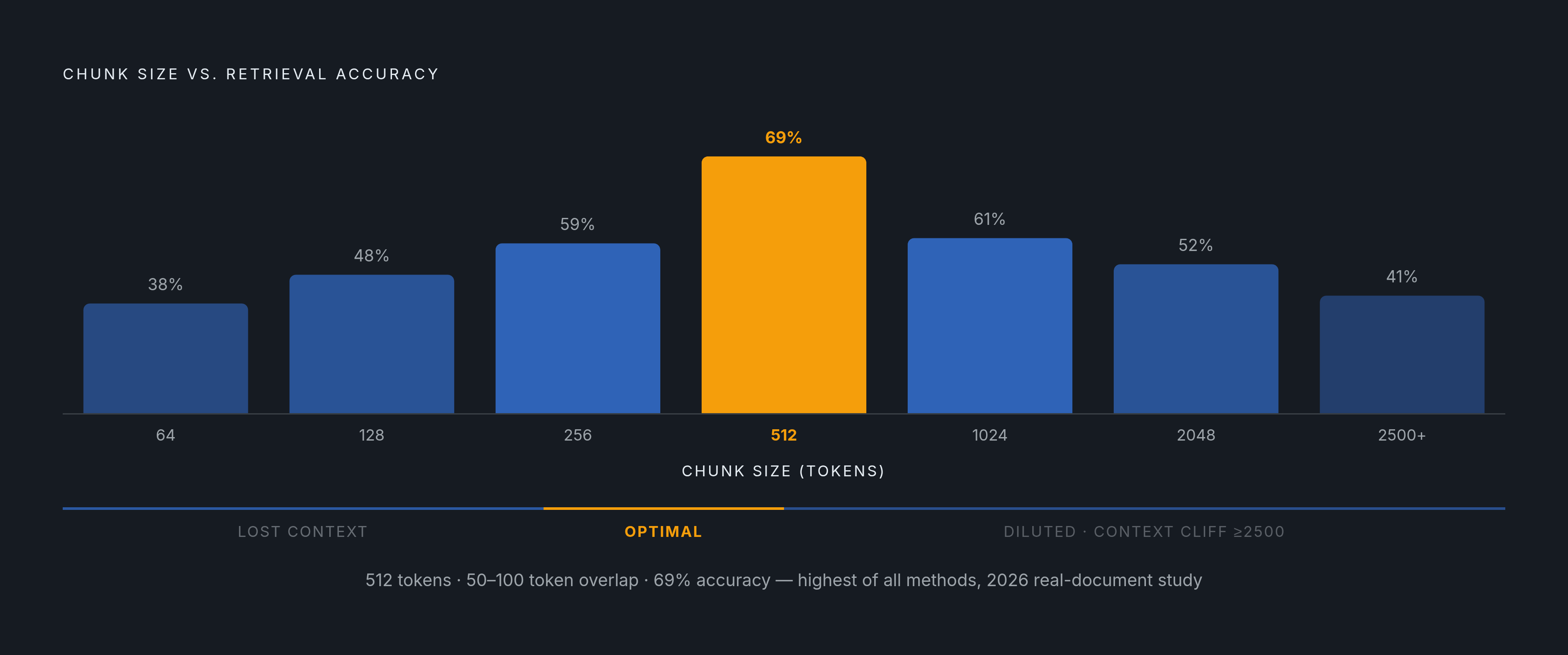
Most teams treat chunk size as a technical detail to set once and forget. That's backwards, and it's the single decision that costs documentation pipelines the most downstream. Chunk size decides what the retriever is even capable of finding, because each chunk becomes an independently searchable unit. Split badly and a chunk spanning two unrelated sections returns noise when either topic gets queried. Split too small and the chunk loses the context that made it meaningful in the first place. Split too large, and the model gets more text than it can use faithfully, which shows up as vague or diluted answers rather than outright errors.
The default starting point in LangChain is RecursiveCharacterTextSplitter, which recursively breaks text on common separators (paragraph breaks, then newlines, then further down) until chunks land near a target size. The benchmark evidence on what that target size should be is more settled than the surrounding debate suggests: 512 tokens with 50 to 100 tokens of overlap scored 69% accuracy in the largest real-document test run in 2026, beating every more elaborate and more expensive alternative tested alongside it, while needing zero extra model calls to compute. A practical starting range sits at 400 to 512 tokens with 10% to 20% overlap.
That overlap figure isn't padding. It exists because a concept split cleanly across a chunk boundary becomes unrecoverable otherwise: neither half holds the whole idea, and neither matches a query looking for it. Documentation with dense cross-referencing, the kind where one paragraph assumes context from three paragraphs earlier, should sit toward the higher end of that 10% to 20% range rather than the lower end.
Semantic chunking, where a model decides where topic boundaries fall instead of a fixed character count, is the part of this conversation that gets oversold, and it's worth saying plainly: skip it for most documentation pipelines. Research on realistic document sets has found fixed-size chunking consistently beat semantic chunking on both retrieval accuracy and the quality of the generated answer, concluding the extra computation semantic chunking demands wasn't earning its keep. Semantic chunking lifts recall by up to 9% over simpler methods in some settings, sure, but at the cost of running an embedding pass over every sentence instead of every fixed-size block. That's a lot of extra compute for a gain that doesn't reliably show up once the answer quality gets measured rather than the retrieval score alone.
Research from Chroma published in July 2025, testing 18 models including GPT-4.1, Claude 4, and Gemini 2.5, found retrieval quality degrades as context length grows, and a systematic analysis from January 2026 identified something close to a "context cliff" around 2,500 tokens, past which response quality drops sharply. That same analysis found sentence-level chunking matched semantic chunking's performance up to roughly 5,000 tokens, at a fraction of the compute cost. So the expensive approach doesn't reliably buy what it promises, not on the documents these studies actually tested. There's little reason to reach for it by default.
Documentation carries a couple of chunking strategies specific to its own structure, worth naming apart from the general debate above. Parent Document Retrieval splits into small chunks for the search step but hands the model the larger surrounding section for generation, useful for reference docs where a two-sentence passage means nothing without the paragraph around it. NVIDIA's benchmarking across five document sets found page-level chunking, one chunk per PDF page, averaged 0.648 accuracy and performed strongly across those sets, which matters for PDF-heavy reference documentation specifically. For Markdown-based docs, splitting on heading boundaries rather than raw character counts keeps a section intact as a unit, which lines up with how people actually phrase questions. They ask about a feature, not about an arbitrary 500-character window of prose.
Turning chunks into vectors: embedding model selection and what breaks if you get it wrong
An embedding model turns a chunk of text into a vector of numbers, placed so that chunks with similar meaning land close together in that numerical space. Cosine similarity is the standard yardstick for "close": a score near 1 means highly similar, near 0 means unrelated, and negative values mean the vectors point in opposite directions. Retrieval, underneath all the tooling, is just finding which stored vectors sit nearest to the query's vector.
One rule here doesn't bend: the same embedding model has to generate both the stored vectors and the query vector. A vector produced by one model carries no meaningful relationship to a vector space built by a different model, even when both models are technically doing "the same job." Switch embedding models and the whole corpus needs re-embedding from scratch. There's no partial upgrade path, no shortcut.
Reaching for a general chat model to do an embedding model's job is the mistake worth calling out directly, and it's more common than it should be. Purpose-built embedding models run smaller and faster, and they perform better at this specific task, full stop. nomic-embed-text is a 274 MB model that outputs 768-dimensional vectors. Pointing a general chat model like llama3.2:3b at the same task means running something roughly seven times larger for worse results. That's not a close call, and anyone defending it is usually defending inertia, not a technical argument. LangChain supports several solid purpose-built options instead: OpenAIEmbeddings, producing 1536-dimensional vectors and needing no local GPU since it's hosted; SentenceTransformers with a compact sentence similarity model; and HuggingFaceBgeEmbeddings, a free option that runs locally.
Technical documentation raises a wrinkle general-purpose embedding models don't always handle well: jargon, version strings, and API names that look semantically similar to a general model but mean functionally different things to a developer. A model that treats v2.1 and v3.0 as nearly identical text is going to blur exactly the distinction documentation users care about most. Testing against a real sample of the actual documentation before committing to a model at scale takes maybe an hour. Skipping that hour is how teams end up debugging a "broken" retriever three months in that was never broken, just blind to version numbers the whole time.
One operational note that saves confusion later: embedding is a one-time cost paid at index time for the whole corpus, but at query time only the user's question needs embedding. Those are very different cost profiles, and mixing them up leads to bad estimates of what a production system actually costs to run.
Storing and indexing vectors: choosing between local and hosted vector stores
A vector store is a database built for one job: finding the nearest neighbors to a given vector, fast, even across millions of entries. LangChain provides one shared interface across different vector store backends, so switching from one to another doesn't mean rewriting the retrieval logic sitting on top of it.
For local development and smaller corpora, FAISS, the open-source similarity search library from Facebook, is a standard choice: it runs in memory, needs no separate server, and moves fast enough for most prototyping work. Chroma is local-first too but persists to disk and sets up with almost no friction, which is why the official LangChain RAG tutorial uses it (that tutorial's example run indexed 782 chunks). Once a corpus grows large or needs to serve multiple tenants, Pinecone offers a hosted, managed option that scales without anyone running infrastructure. Weaviate is open-source with a hosted option too, and it supports hybrid search natively, a detail that matters in the next section.
The choice most teams get wrong isn't which vendor to pick. It's treating the index like a one-time setup step instead of a living thing that needs upkeep. Tutorials index once, at startup, and never touch it again. Production systems don't get that luxury. Documentation changes, sometimes daily, and a static index sitting against a live, evolving product drifts out of sync unless it's persisted properly and refreshed on some kind of schedule. That refresh cadence isn't something the tooling decides for a team. It has to be built in on purpose, and skipping it is how a system quietly starts answering questions about a version of the product that no longer exists.
Metadata filtering deserves particular attention for documentation specifically, and skipping it is the mistake that does the most damage downstream, more than picking the "wrong" vector store ever does. Most vector stores support filtering by metadata, version, section, product line, before running the nearest-neighbor search itself. For any documentation set covering multiple versions, this isn't optional. Without it, a retriever can surface a chunk that's accurate for version 2.1 in response to a question about version 3.2, and the answer reads as perfectly confident while being quietly wrong.
There's a failure mode worth naming too, because it throws no error at all: indexing with one embedding model and querying with another. Nothing crashes. Retrieval just silently stops surfacing relevant chunks, and the system looks broken in a way that's genuinely hard to diagnose unless someone thinks to check which embedding model built the index in the first place.
Configuring the retriever to return the right chunks for documentation queries
The retriever's job sounds simple: embed the incoming query, compare it against every stored vector, and hand back the top-K most similar chunks as context for the model. The number K is a real dial, with consequences in both directions. Set it too low and the retriever misses context that would have answered the question. Set it too high and the extra chunks add noise that drags down the quality of the generated answer, since the model now has to sort signal from filler. For documentation, a starting range of 3 to 5 chunks is reasonable, then adjust based on testing against real questions people actually ask.
Dense vector search alone struggles with a query pattern documentation users produce constantly: short, exact lookups like a specific function name or an error code. Vector similarity is built for semantic closeness, and a four-character error code doesn't carry much semantic content to work with. Relying on dense search by itself for this kind of query is the choice most teams regret first, usually around the same time someone files a bug report saying the assistant "can't find anything" about an error they can see right in front of them.
Hybrid search fixes it by combining BM25, a classic keyword-matching algorithm, with dense vector search, and the combination lifts recall meaningfully over dense search alone, at a latency cost under 6 milliseconds according to production RAG research. Weaviate handles this natively. Other vector stores need a BM25 retriever running alongside a dense retriever, with the results merged, often with a reranking step layered on top.
That reranking step deserves its own look. The pattern: retrieve a wider candidate pool, say the top 20 chunks, then run a cross-encoder reranker over that pool to reorder by actual relevance before handing the final, smaller set to the language model. It adds a processing step and some latency, but for technical queries where precision matters more than speed, the gain in answer quality tends to justify it.
Metadata-filtered retrieval comes back into play here too, not just at the storage stage. When documentation spans multiple product versions, filtering by version metadata at query time is what stops the retriever from handing back a semantically perfect match for the wrong release. Parent Document Retrieval earns its place again at this stage as well: search against small, precise chunks for accuracy, but hand the model the larger parent section so it has enough surrounding text to build a coherent, contextualized answer instead of a fragment.
Prompt design and chain construction: where retrieved context becomes a grounded answer
Everything upstream, loading, chunking, embedding, storing, retrieving, exists to feed this final stage: combining retrieved chunks with the user's question into a single prompt and sending that to the model. LangChain's composition tools handle the wiring, typically through a RetrievalQA chain or a custom chain connecting retriever, prompt template, model, and output parser in sequence.
The prompt itself carries more weight than it gets credit for, and it's the step people cut corners on most often. Telling the model to answer only from the provided context, and to say plainly when the context doesn't contain an answer, isn't a nice-to-have. Skip that instruction and the model falls back on its training data to paper over the gaps, which undoes the entire point of building a retrieval pipeline in the first place. What was the point of grounding the system in current documentation if the model still improvises the moment the retrieved chunks come up short?
Including source metadata (section title, version number, original URL) inside the context handed to the model matters too, because it lets the generated answer point to exactly where it came from. Anyone using a documentation assistant in a real workflow needs to check what they're reading against the source, and an answer with no citation trail asks for blind trust most engineers, reasonably, won't hand over. For systems handling multi-turn conversations, folding prior conversation history into the prompt keeps follow-up questions coherent instead of treating each message as though it arrived out of nowhere.
None of this is complicated in isolation. Getting all six stages right at the same time (loader, chunker, embedder, store, retriever, prompt) is the actual work. That's where the gap opens up between a demo that impresses in a meeting and a system that survives contact with real documentation users asking real, messy, version-specific questions.