ReadTheDocs Configuration and Hosting for Open Source Projects
Webhook-driven builds keep your docs in sync with every code commit.
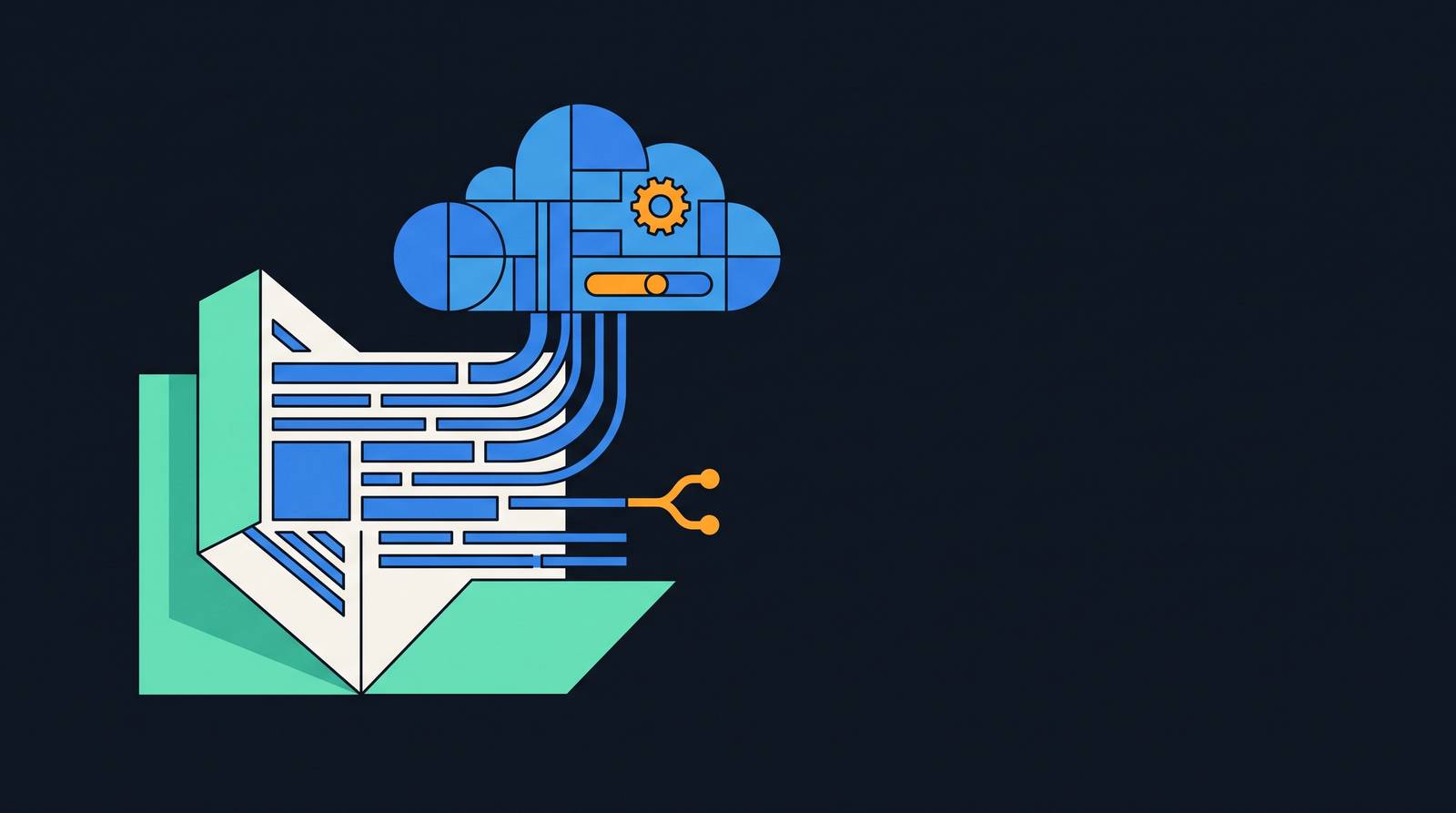
Docs-as-code is a discipline, not a feature. The premise: your repository is the single source of truth for documentation, governed by the same version control, review, and deployment machinery as application code. Read the Docs is built around this model.
When you connect a repository, RTD registers a webhook with your VCS provider. From that point, every push to a tracked branch triggers an automatic build. Pull requests generate isolated preview builds, so a reviewer sees rendered output before anything merges. The configuration file governing the build lives in the repository itself, moving through code review alongside the documentation content it affects.
Supported VCS providers are GitHub, GitLab, and Bitbucket. As of Version 14.0.0 in June 2024, RTD dropped support for Subversion, Mercurial, and Bazaar. The rationale was blunt: fewer than 0.02% of requests to GitHub's backend came through a Subversion endpoint as of 2023. Maintaining three additional VCS integrations for a share of usage that small is an engineering liability that compounds across every subsequent release cycle. The decision reflects a coherent philosophy about operational surface area.
What the webhook model gives you, practically, is auditability. Any version of your docs traces to a specific commit. You may never need that trace, until a production docs change breaks something, no one can reconstruct what was deployed when, and the audit trail is the only thing that keeps a two-hour investigation from becoming a two-day one. Teams who have been through that tend to value it retroactively, and not abstractly.
The.readthedocs.yaml file: structure, required keys, and why it became mandatory
For years, Read the Docs would attempt to auto-detect your project's configuration, inferring the documentation tool, Python version, and build environment from whatever it found in the repository. Convenient in theory. In practice, a source of subtle, difficult-to-reproduce breakage: builds that passed for undocumented reasons and failed for equally undocumented ones, with no configuration artifact to inspect. That raises an important question: if a build succeeds but no one can explain why, does the configuration actually exist?
As of January 20, 2025, a .readthedocs.yaml file is mandatory for all Sphinx and MkDocs projects. The filename must be exact, at the repository root. Variants like readthedocs.yaml or .readthedocs.yml are deprecated and will not be recognized.
The version: 2 key is required. When a version 2 file is present, web interface settings are ignored entirely. This is deliberate: configuration in the file takes complete precedence, eliminating the class of bugs where a dashboard setting quietly overrides something you specified in code. That failure mode is easy to underestimate until you have spent an afternoon looking at the wrong place.
The essential structural fields: build.os pins the operating system, typically ubuntu-24.04; build.tools.python pins the Python version; build.tools also accepts nodejs, rust, and golang version specifications for non-Python toolchains. The tool-specific config path is declared under sphinx.configuration or mkdocs.configuration. Dependencies go under python.install, referencing a requirements file. Additional output formats, PDF, EPUB, and HTMLzip, are declared under formats. The search.ranking field accepts integers from -10 to +10, letting teams boost or suppress specific pages in RTD's search results.
One validation behavior worth knowing before your first failed build: RTD validates every config file during build, and any unrecognized key causes an immediate failure. Mistype sphinx.configuration as sphinx.config and the build fails explicitly, rather than silently falling back to auto-detection. That strictness is typo protection, not pedantry.
Configuration is also per-version, not per-project. A branch representing version 1.x can specify an older Python version and OS; main specifies current ones. For projects maintaining long-lived release branches, this distinction is not academic.
Reproducible builds: why pinning versions matters and how to do it
Here is a failure mode that takes real experience to develop an instinct for: a build that works today and breaks three months from now, with no changes to your documentation source. The cause is almost always an unpinned dependency that received an upstream update. An extension drops Python 3.8 support. A theme package introduces a breaking change in its templating API. A transitive dependency shifts. Tracing the cause requires reconstructing which package versions were installed at the time of the break, which is difficult when you never recorded them. But what if you never have to reconstruct that history at all, because you pinned everything from the start?
Pin everything. The OS version goes in build.os. The Python version goes in build.tools.python. Every package dependency goes in a requirements file with exact version specifiers, committed to the repository, referenced in python.install.
Because the config file lives in Git alongside your content, the exact environment that produced any historical version of your docs is preserved. Check out a tag, and the config file specifies the OS, Python version, and dependency list that existed when that release shipped. A loose dependency specification offers no such guarantee; rebuilding an old version might install whatever current packages satisfy the range and produce something entirely different from what was originally published.
The concrete distinction: a loose spec says sphinx>=7.0; a pinned spec says sphinx==7.4.7. Both build today. Six months from now, the loose spec might install Sphinx 8.x, which changed something in the theming or extension API your project depends on. The pinned spec installs what you tested. Your direct dependencies also pull in transitive packages you haven't specified, which is why tools like pip-compile exist to lock the full dependency graph rather than just the top-level list. The top-level pin is necessary but not sufficient.
Customizing builds with build.jobs and build.commands
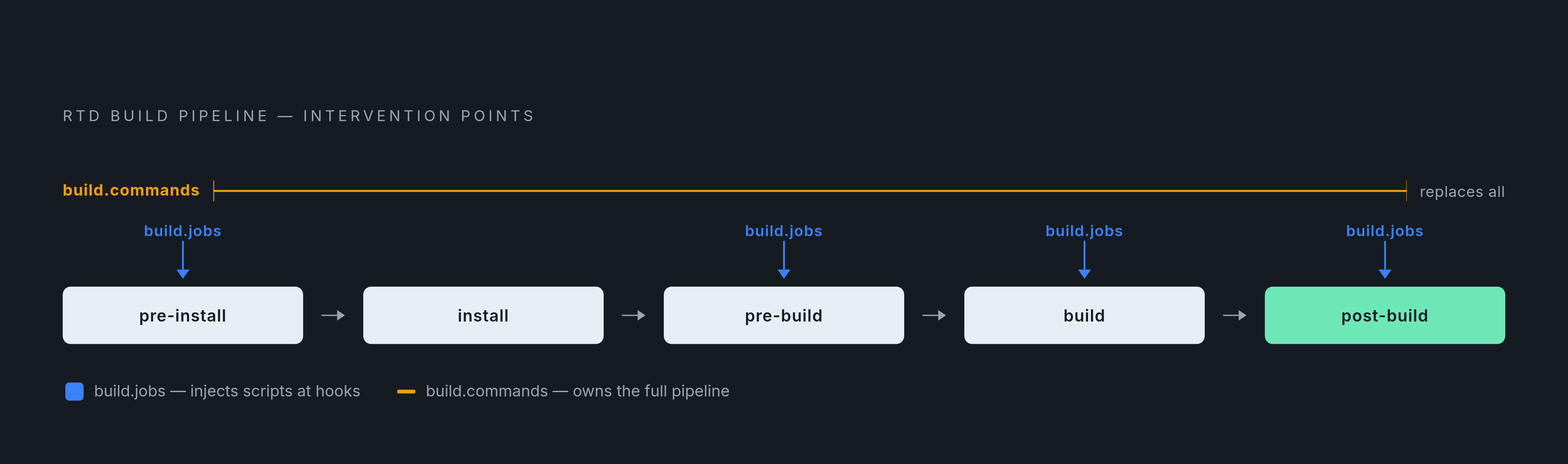
The standard RTD build pipeline covers the majority of projects without modification. When it doesn't, two mechanisms exist for extending it, and the choice depends on how much of the pipeline you actually need to own.
build.jobs is the right starting point for most customizations. The build lifecycle runs in sequence: pre-install, install, pre-build, build, post-build. Adding a script to one of these hooks lets you run additional steps without replacing the RTD pipeline that handles environment setup, artifact upload, and Addons integration. Generate an API reference file before Sphinx runs, or run a linter after the build completes: build.jobs covers both without requiring you to reimplement what RTD already handles.
build.commands is a full override. When you specify it, RTD's standard pipeline is replaced entirely by the commands you define. This is appropriate for teams with an existing build process they want to bring to RTD rather than rewrite, and it is the necessary path for JavaScript-based documentation tools. Docusaurus and VitePress projects need a Node.js build step; you specify the Node.js version under build.tools.nodejs, then define the build steps explicitly in build.commands.
Each build runs in an isolated environment, and artifacts are uploaded after a successful run. A failing build does not affect currently published docs. That property feels obvious until you have maintained a pipeline without it.
MkDocs projects needing PDF or EPUB output face a specific limitation: RTD's formats key does not support those formats for MkDocs through the standard pipeline. A custom build.commands block can generate them, though it requires wiring together the appropriate MkDocs plugins and ensuring the output lands where RTD expects to find artifacts.
Tool-specific configuration: Sphinx, MkDocs, and Docusaurus
The choice of documentation tool shapes your RTD configuration, sometimes subtly and sometimes in ways that surface as breaking changes after platform updates.
Sphinx
Sphinx is the default path on RTD and the most fully integrated. Python.org, Django, NumPy, and Pandas all build with it. It processes reStructuredText source and code docstrings, and natively produces HTML, PDF, and EPUB outputs through RTD's formats key. A decade of production use has accumulated in ways that are hard to enumerate but easy to notice when you are debugging edge cases on a less-integrated tool.
Two changes from late 2024 require attention from existing Sphinx projects. First, as of the Addons rollout in October 2024, RTD stopped auto-appending extra configuration to conf.py. Projects that relied on injected context variables need to audit their builds; if your templates reference RTD-provided context that was previously injected, it will no longer be there automatically. Second, RTD stopped installing readthedocs-sphinx-ext by default at the same time. If your project uses that extension, declare it explicitly in your requirements file. Both changes break projects that were inheriting behavior they never explicitly opted into, which covers a meaningful share of long-running Sphinx builds.
MkDocs
MkDocs configuration is simpler: mkdocs.configuration points to mkdocs.yml, and RTD handles the rest through the standard pipeline. In April 2024, RTD removed its previous behavior of directly manipulating mkdocs.yml during builds. All MkDocs projects now run through Addons, and the transition was, by community accounts, largely uneventful.
The PDF and EPUB limitation applies here, as noted above. Teams that need those formats must reach for custom build commands.
Docusaurus and JavaScript-based tools
There is no dedicated RTD configuration key for Docusaurus or VitePress. Both are configured through build.tools.nodejs and build.commands, making setup more manual than the Sphinx or MkDocs paths. RTD's stated direction for 2025 explicitly names expanding build support beyond Sphinx and MkDocs, with Docusaurus and VitePress treated as first-class citizens in intent, if not yet in dedicated config syntax. For now, the build.commands path works and the result is fully supported; teams using these tools should expect the configuration surface to mature.
Monorepo layouts: hosting multiple documentation projects from one repository
Monorepos present a specific challenge for documentation hosting: a single repository may contain multiple distinct projects that should be versioned, searchable, and navigable independently.
The .readthedocs.yaml file can live in a subdirectory; you set the custom path in the project settings dashboard. Paths within the config file, however, remain relative to the repository root, not to the config file's location. This inconsistency reliably produces confusion in first-time monorepo setups. Confirm it explicitly rather than discovering it when a path resolves to the wrong directory mid-build.
The recommended pattern: create separate RTD projects, each pointing at the same Git repository but referencing different config files in different subdirectories. An SDK, a CLI, and a web API in the same monorepo become three RTD projects with three distinct URLs, three version histories, three search indexes. Each is versioned and deployed independently. On the Community tier, each counts as a separate free project.
Versioning, flyout menu, and the Addons architecture that powers them
The old model for delivering RTD features to Sphinx projects was a Python extension that Sphinx loaded during builds, injecting versioning data, flyout menus, and related functionality into the generated HTML. It worked, but it was tool-specific. MkDocs and JavaScript tools had a different, generally inferior experience.
Addons changed the architecture. Rather than injecting functionality through the documentation generator, Addons operate at the hosting layer, injecting features into served HTML regardless of what tool produced it. Addons became the default for all new projects on July 29, 2024, and rolled out to all projects on October 7, 2024.
The practical result: every tool on RTD now gets the same feature set. A flyout menu showing available versions and offline formats, search-as-you-type powered by Elasticsearch across subprojects, traffic analytics, pull request notifications, and a visual diff between rendered versions. A Docusaurus project gets the same version flyout as a Sphinx project, because the flyout is not produced by either tool.
API v3 now supports unauthenticated requests for many endpoints. This enables custom version selectors and download UIs built directly into documentation pages, letting projects expose RTD's data layer and build whatever interface their users need, without being constrained to the default flyout presentation.
AI-readiness features: llms.txt, Markdown negotiation, and agent skills
Documentation that only renders legibly to humans is becoming a meaningful constraint. If an agent trying to understand your library's API must scrape HTML, parse navigation elements, and filter boilerplate to extract content, your documentation is effectively invisible to a growing class of users. Whether that matters to a given project depends on the project; assuming the answer is no is a choice worth making deliberately rather than by default.
RTD now serves llms.txt and llms-full.txt from documentation domains automatically, providing a structured index for AI tools that follow the emerging llms.txt convention. Any documentation page can also be requested as clean Markdown rather than HTML through content negotiation, allowing agents to retrieve readable content without HTML parsing.
RTD also publishes agent skills for Claude Code and Cursor, teaching those tools to interact with the RTD API directly. For developer teams already running AI coding assistants, this reduces friction in managing documentation projects from within existing workflows.
None of this requires configuration from the project maintainer; it is delivered at the hosting layer. It is also worth considering what this invites beyond mere convenience: a shift in how you think about documentation as a surface. Machine-readable formats are a form of accessibility, in the technical sense: they determine which classes of users can reach your content at all. Static HTML that only humans can navigate is a ceiling, not a foundation.
Community hosting vs. Business plans: what the free tier covers and where it ends
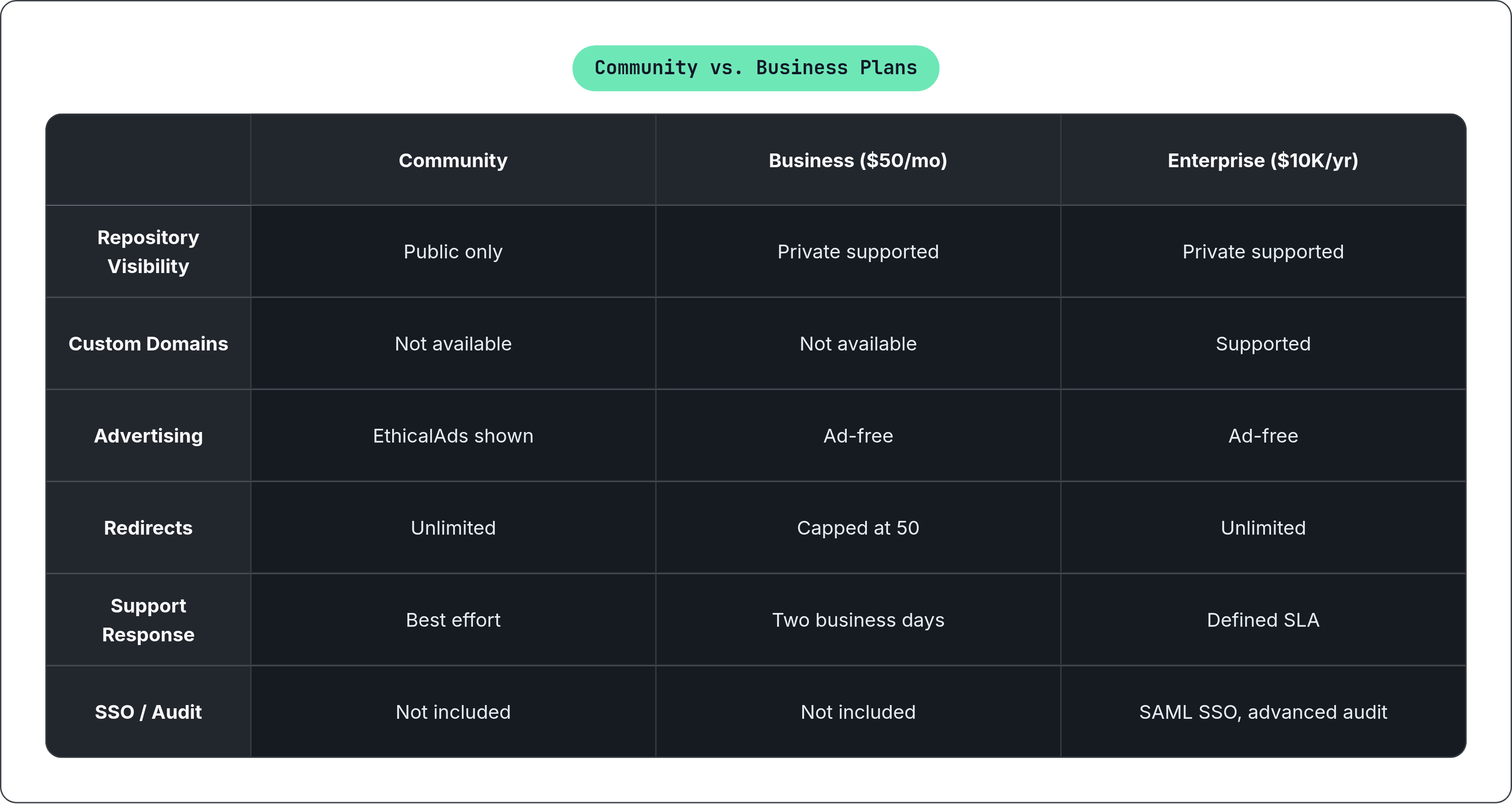
The Community tier covers automatic builds, versioning, search, pull request previews, CDN hosting, and all Addons features, at no cost, for public open source repositories. EthicalAds funds the platform; documentation pages carry advertising. For most open source projects, this covers every hosting and build need they will encounter.
The meaningful constraint is repository visibility. Community hosting requires public repositories. Private repositories require a Business plan.
Business plans begin at $50 per month. Enterprise starts at $10,000 per year, covering SAML SSO, dedicated build infrastructure, advanced audit tracking, and a defined SLA. The $50 per month plan carries specific limitations worth understanding before committing: redirects are capped at 50, custom domains are unavailable, pageview analytics are absent, and content embedding is not supported. Support response time at that tier is two business days; the $250 per month plan reduces that to one day. Community tier support is best effort.
The ad-supported nature of Community hosting occasionally becomes a practical consideration for projects with brand-conscious maintainers or documentation serving a professional audience where third-party advertising feels incongruous. Business plans are ad-free. That is rarely the reason teams upgrade, but it is a real distinction, and one worth surfacing before you need to explain it to a stakeholder.
Getting a project live: the practical sequence from repository to published docs
The sequence from repository to published documentation is genuinely short.
Connect the repository through RTD's import flow, which handles webhook registration with GitHub, GitLab, or Bitbucket. Create .readthedocs.yaml at the repository root with, at minimum: version: 2, build.os, build.tools.python, and your tool-specific config path under sphinx.configuration or mkdocs.configuration. If your build requires dependencies, add a pinned requirements file and reference it under python.install. Push to the default branch; RTD builds automatically.
The build log in the RTD dashboard is where first-build failures surface. The most common issues are a missing config file, which has been a hard requirement since January 2025; a deprecated filename variant; or a path resolving incorrectly because it was measured relative to the config file rather than the repository root. Validation errors on unrecognized keys appear here too. Fix, push, and the webhook triggers another build.
After a successful build, Addons are active by default. The flyout menu and search appear without additional configuration.
Versioning follows from Git tags. Tag a release in your repository and RTD creates a corresponding version entry automatically, building from that tag's state and making it available in the flyout alongside your active branches. For larger projects, search.ranking tuning becomes relevant: boosting primary documentation sections and suppressing changelog or internal-only pages produces a noticeably better search experience. Custom build commands are the next threshold, reached when your toolchain diverges from the Sphinx or MkDocs standard paths. A Business plan upgrade becomes relevant only when private access, custom domains, or usage analytics enter the picture.
RTD's core value proposition is that someone else manages build infrastructure, CDN, search indexing, and versioning, so you manage content. That trade involves real constraints on pipeline customization. Most open source projects never encounter those constraints. The ones that do tend to find out quickly, at which point build.commands usually restores the control they need, and the question of whether to stay on the platform answers itself through use rather than analysis.