documentation platforms with built-in interactive API playgrounds
Playgrounds embedded in docs cut the time developers spend guessing at API calls.

Most developers don't quit on an API because the concept is confusing. Instead, they quit because getting from "I've read the docs" to "I made a successful call" takes too long, and somewhere in that gap they close the tab. This piece looks at documentation platforms that build a working API client directly into the reference page, closing that gap instead of leaving developers to build a request from scratch in Postman or curl. Postman's 2024 State of the API report names the usual suspects: inconsistent documentation, developers digging through source code because the docs didn't answer the question, and an over-reliance on colleagues who happen to know the API better than the docs do. Multiple surveys put the dropout rate at roughly half of developers when the docs fail to answer their first question, a startling number when you consider how much engineering time goes into building the API in the first place.
Before playgrounds existed in any real form, a developer had to open Postman or Insomnia, hunt down an API key, guess at the shape of a valid request body, and point the whole thing at the right base URL, all before seeing a single response come back. That's not a documentation quality problem so much as a tooling gap: the place where developers read about an API and the place where they actually run it were two different surfaces, often two different applications, and every hop between them cost time and attention. The platforms compared below all attack that same gap. What separates them is how much of the gap they actually close, and how much they leave for the developer to figure out on their own.
What time-to-first-call actually measures and why it anchors this comparison
Time-to-first-call, TTFC for short, measures the minutes between a developer landing on the docs (or getting handed an API key) and successfully getting a response back from a live endpoint. It sounds like a small metric, but it isn't.
Postman ran an internal experiment on this exact question and found that handing a developer a ready-to-use collection, rather than asking them to build one, dropped TTFC on one API from around 17 minutes to around 10. Other APIs in the same study saw even bigger drops. The industry has settled on rough tiers for what that number means: under two minutes counts as "Champion" territory, two to five minutes is still competitive, and anything past five minutes is a signal that something in the onboarding flow needs a hard look.
Why does a few minutes matter so much? Because TTFC isn't just an onboarding statistic, it's a retention predictor. A developer who gets stuck for ten minutes before their first successful call is measurably more likely to abandon the integration than one who gets a response back in ninety seconds. An embedded, functional client on the reference page removes an entire category of setup work, credential wrangling, request-shape guessing, environment switching, without ever asking the developer to leave the page they're reading. That's the whole point.
It's worth being blunt about what doesn't count here. A "Try It" button that hands you a curl command to paste into your own terminal isn't compressing TTFC in any meaningful sense; it's just moving the friction one step later. For the compression to be real, the client has to live inside the docs, ideally pre-authenticated, so the developer never has to context-switch to a separate tool just to see what a response looks like.
The features that separate a real playground from a "Try It" button
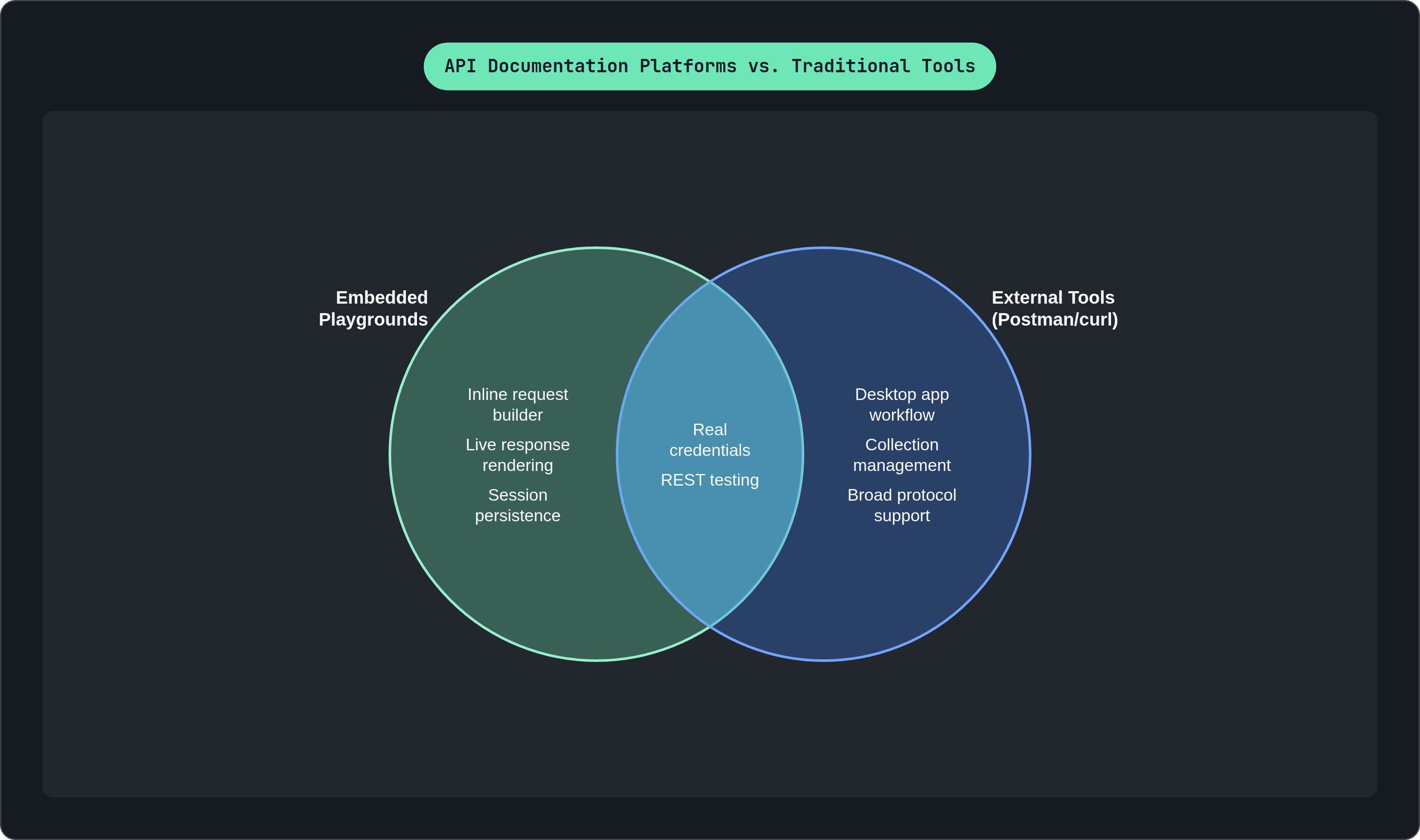
A playground earns the name when it has three things at minimum: an inline request builder, live rendering of the actual response, and an authentication field that takes real credentials rather than a placeholder token. Past that baseline, the differences get interesting fast.
Authentication is where a lot of playgrounds quietly fall short. Some store credentials only in the developer's browser, which is the safer pattern since sensitive tokens never touch a third party's servers. Others proxy the request through their own infrastructure, which raises a fair question any security-conscious team should ask out loud: where exactly does my API key travel before it reaches my server? Beyond storage, there's a real UX gap between platforms that auto-populate a JWT or walk you through an OAuth flow versus ones that just ask you to paste a token by hand every time. Persistence matters more than it sounds like it should, too: a playground that forgets your credentials on every page refresh is adding a small tax that adds up across a documentation session with a dozen endpoints.
Protocol coverage is another quiet limitation. Most playgrounds test REST endpoints only, which was fine when REST was most of what existed. It's less fine now that streaming APIs, WebSocket connections and Server-Sent Events, are showing up across more products. On most platforms, testing those still means leaving the docs entirely and reaching for a separate tool, which defeats a good chunk of the point.
Selective disabling deserves a mention too. Not every endpoint should be live-testable from a public docs page; a delete-user or process-payment endpoint probably shouldn't be one click away from an accidental production call. The better platforms let a team exclude specific endpoints from the interactive playground while keeping them fully documented in the reference. Coverage of this control varies by platform, so it's worth checking before you assume it exists.
Then there's code sample quality (generic curl placeholders versus actual working SDK calls in the language a developer will use), analytics on what people are actually testing and where they're failing, and whether the platform offers a mock server so teams can let developers experiment without pointing live traffic at production. Each of these turns up again and again in the platform breakdowns below, so keep them in mind as a checklist while reading.
Fast deployment from OpenAPI specs with a functional browser client
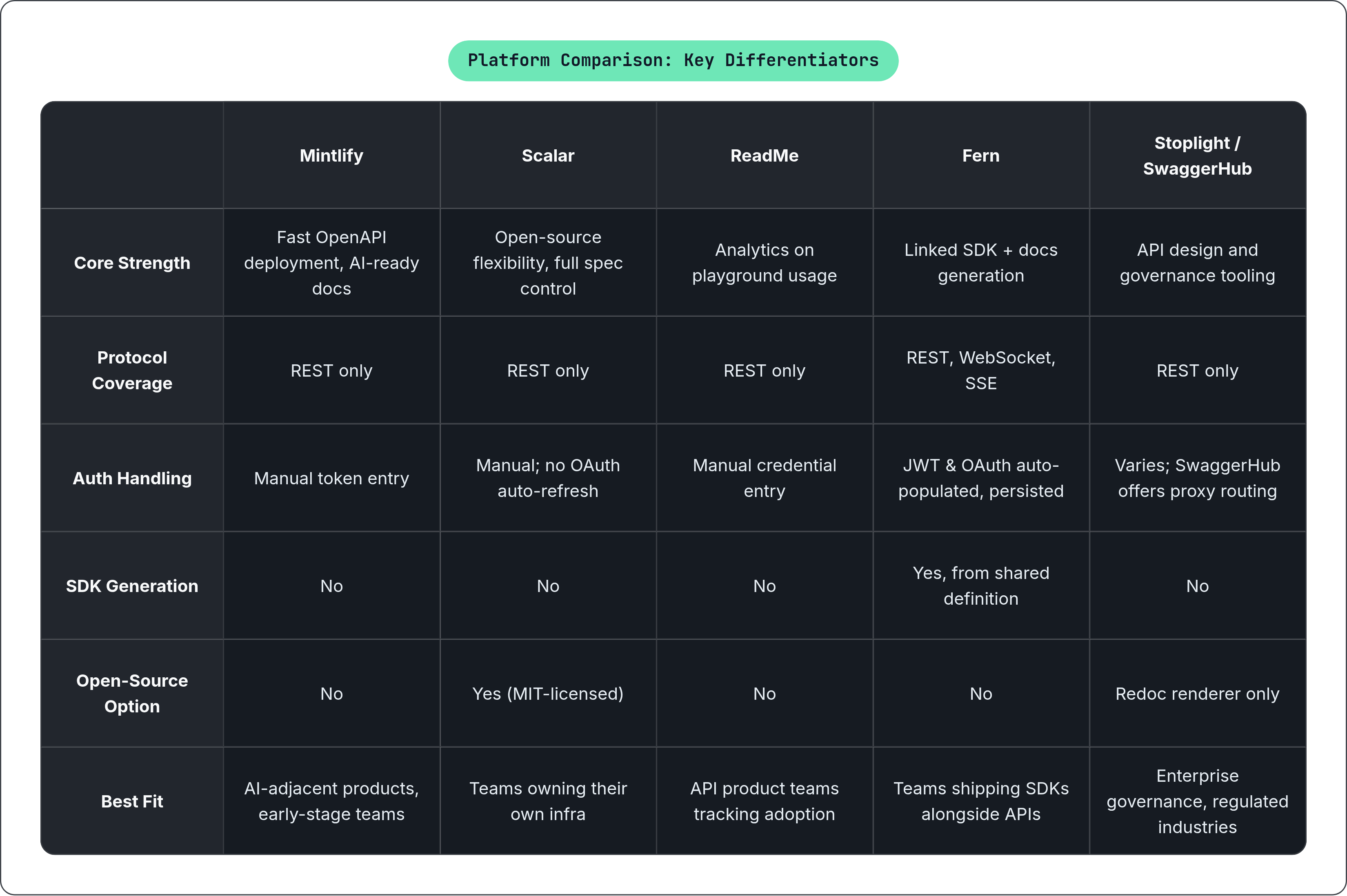
Mintlify builds interactive references straight from an OpenAPI spec and pairs it with MDX-based guides, and the whole setup is built to get a documentation site live with minimal configuration on the developer's part. The playground itself lets a visitor test endpoints and watch live responses come back in the browser, with code examples auto-generated across several languages including cURL, Python, and JavaScript.
One notable characteristic is that the platform treats docs as something that feeds directly into AI workflows, rather than static pages sitting off to the side. That's a real fit for teams building products that ship alongside AI agents, since it means the reference material is structured to be consumed by more than just human eyes. The company counts Anthropic, Cursor, Perplexity, and Coinbase among its users, which tells you something about the scale of API surface the platform is built to handle.
There are real limits, though. The platform doesn't generate client SDKs, so if your team wants maintained libraries in multiple languages, that's a separate project entirely; the code snippets in the playground are illustrative rather than actual SDK method calls. Also, like most of the field, the playground is REST-focused; WebSocket and SSE testing aren't part of the browser client.
On pricing, the free Hobby tier is generous by category standards. It includes the playground itself, custom domains, and custom components, which lowers the bar considerably for open-source maintainers and early-stage teams who can't justify a paid tool yet. The Pro plan is a real step up in cost, and Enterprise (SSO, SOC 2, white-labeling) requires talking to sales directly.
An open-source renderer that blurs documentation and API client
An MIT-licensed renderer, deployable as a CDN script tag, a React component, or a full hosted docs site. That range of deployment options is exactly why it's picked up traction among teams that already run their own documentation infrastructure and don't want to hand the whole thing over to a managed platform. Microsoft made a notable bet on it too: according to Microsoft Learn's 2025 documentation, ASP.NET Core 9 replaced Swagger UI with this renderer as its default API reference tool, which is a meaningful vote of confidence from a company with its own long history in developer tooling.
The interactive client here goes a step further than most embedded playgrounds. A desktop app version reads and edits the OpenAPI document itself, rather than spinning up a separate collection that can drift out of sync with the spec over time. Spec support is also ahead of the pack in one specific way: full OpenAPI 3.1 compliance since 2024, including JSON Schema 2020-12 and webhook support, areas where several competitors still have gaps.
That said, there are real gaps of its own. There's no OAuth auto-refresh, so tokens that expire mid-session need to be manually replaced. Credentials don't persist across sessions, meaning a developer re-entering the docs the next day starts from zero. On top of that, it's REST-only, same limitation as most of the field on WebSocket and SSE.
This is a strong fit for teams that want open-source flexibility and full control over the documentation's look and feel without paying for a managed platform. Pricing on the hosted paid tier isn't published anywhere public, so budgeting requires an actual conversation with the team.
A mature try-it console paired with playground analytics
The interactive console here is one of the more established in the category. Developers plug in their own credentials, fire a real request, and watch the request and response render in real time, all without leaving the reference page they started on. Code samples span more than 20 languages, which covers a wider set of developer contexts than most competitors bother supporting.
What actually sets this platform apart isn't the console itself, though. It's the analytics layer sitting behind it: a dashboard showing which endpoints developers actually test, where their calls fail, and how long time-to-first-call is running in practice. That turns the playground from a nice-to-have UX feature into a real data source, which matters a great deal to an API product manager who wants adoption numbers instead of guesses.
An AI tool launched in October 2025 adds documentation linting, style consistency checks, and an AI-powered search feature. These are useful additions, but they sit behind the Business plan, so teams on a lower tier don't get access without upgrading.
Pricing has a real cliff worth flagging plainly. The Startup plan covers basic hosting at a modest monthly rate. Business unlocks the AI suite, the audit tooling, review workflows, and SSO, and the jump from Startup to Business is close to fivefold, which catches teams off guard if they didn't plan for it from the start. Enterprise pricing runs upward of roughly $3,000 a month with no published tiers, so forecasting that cost means picking up the phone.
Fern: SDK generation linked directly to the interactive explorer
Fern generates both interactive documentation and multi-language SDKs from one shared API definition, and the practical result is that the code samples in the explorer aren't placeholder curl commands. They're the actual SDK calls a developer would write in their own codebase.
That detail matters more than it might sound. It means what a developer tests in the playground is exactly what they'll ship, closing the usual gap where the docs show one thing and the real integration code ends up looking different once you account for error handling, retries, and pagination.
Authentication handling here is the most complete of any platform in this comparison. It integrates with JWT and OAuth flows to auto-populate credentials and keeps them persisted across sessions, closing two gaps that show up elsewhere in this list. Protocol coverage is where Fern really stands apart, though: it supports WebSocket and Server-Sent Events directly inside the browser playground, which makes it the only mainstream platform here that lets a developer test a streaming endpoint without leaving the documentation page.
The linked-generation model also pays off on maintenance. When the API definition changes, the docs and the SDKs regenerate from that same source, so the usual drift between "what the docs say" and "what the SDK actually does" doesn't build up over time. The clear fit is a team that ships SDKs alongside its API and doesn't want two separate maintenance tracks for keeping them in sync.
Stoplight, SwaggerHub, and a third renderer: design-phase tooling with varying playground depth
These three sit closer to the API design phase than the other platforms covered so far, and their playground depth reflects that priority.
Stoplight's real value is the visual OpenAPI editor, which lets teams collaborate on a spec without hand-editing raw YAML. The "Try It Out" feature runs test calls against a staging environment right from the docs page, and it works, but it's clearly downstream of the design tooling rather than the platform's central investment. There's no built-in documentation analytics either; a team that wants usage data on the playground needs to wire up their own instrumentation. Stoplight is now owned by SmartBear, which also owns SwaggerHub, so there's some product overlap worth keeping an eye on as both roadmaps evolve. Entry-level paid pricing starts at $44 a month.
SwaggerHub is built for a different scale of problem: large enterprise teams managing dozens or hundreds of APIs under a shared governance model, with on-premise deployment available for regulated industries that can't put specs in a public cloud. Its "Explore" feature runs test calls in a sandbox, and it has a routing option worth noting: requests can go straight to the target server or get proxied through SwaggerHub's own infrastructure, giving a team real choice over where credentials actually travel. A built-in mock server rounds this out, letting teams test documentation flows without ever hitting production. Entry pricing starts at $35 a month, with enterprise tiers scaling well beyond that for larger seat counts.
The Redoc renderer, meanwhile, is well known for a clean three-panel layout in the style Stripe popularized, and it renders OpenAPI specs cleanly. The catch is that interactive testing, the actual "Try It" console, only ships on the paid hosted tiers; the open-source, self-hosted version renders documentation beautifully but doesn't include a live client. Spec support has some edge-case gaps in OpenAPI 3.1 relative to competitors that finished full 3.1 compliance earlier. The fit here is a team that cares most about how the reference looks and reads, and is either fine adding a separate testing tool or willing to pay for the hosted plan to get interactivity.
GitBook and Postman: platforms where the playground is one part of a larger system
Neither of these two treats the playground as its main selling point, and that's worth understanding before evaluating either one on playground depth alone.
GitBook's pitch is consolidation: API reference, product guides, SDK docs, and internal knowledge base living in one system instead of four separate tools. For a team currently juggling a wiki, a docs site, and a knowledge base across different platforms, that consolidation has real value on its own. OpenAPI sync keeps the API reference current automatically, Git Sync ties the docs to the underlying codebase, and the visual editor is approachable enough for non-engineers to contribute directly. Interactive testing is included, but it's not what differentiates GitBook from the field; breadth of content type is. Worth flagging on pricing: AI search sits behind a paid site plan while AI writing sits behind a separate paid user plan, so a team budgeting for both features needs to account for two different pricing axes, not one.
Postman comes at this from the opposite direction. It's the API client that a huge number of developers already have open on their desktop, and its documentation feature generates docs straight from an existing Postman Collection. If a team already lives inside Postman for testing and internal collaboration, publishing docs becomes a byproduct of work they were already doing rather than a new tool to adopt. The published docs are genuinely interactive too; a visitor can fire calls straight from the page. The tradeoff is one of identity: Postman is an API lifecycle platform that happens to include documentation, not a documentation platform built from the ground up around the reading experience. Teams that want the docs to be the primary product, with full control over layout, content structure, and design, generally find purpose-built documentation platforms more flexible for that job.
How to match a platform to what your API and team actually need
Start with the honest question: is REST-only coverage enough for what you're documenting? If so, several platforms already deliver a genuinely functional embedded client, and the choice comes down to secondary factors, how credentials are stored, whether usage analytics matter to your product team, and whether you want a hosted platform or something you self-host and control end to end.
Protocol coverage, though, isn't really a preference; it's a hard constraint once it applies. If your API has WebSocket or SSE endpoints and you want developers testing them without leaving the docs, the field narrows sharply, since most platforms simply don't cover those protocols in the browser client yet.
SDK maintenance tells a similar story. If you want your documentation and your client libraries generated from the same source so they can't drift apart over time, that's a fairly specific requirement, and it points toward a platform built around linked generation rather than treating docs and SDKs as separate projects maintained by separate teams.
If turning playground usage into a product metric, endpoint-level test data, drop-off points, actual time-to-first-call numbers, matters to how your team measures developer adoption, that data layer becomes the deciding factor over any single UX feature. And if open-source licensing or full self-hosting is a non-negotiable requirement for your infrastructure team, that also narrows the field considerably, pointing toward tools built with that flexibility from the start rather than bolted on later.
Large organizations managing dozens of APIs under a shared governance model, especially in regulated industries that need on-premise deployment, are usually better served by platforms built around spec standardization and mock servers than by any of the more developer-experience-focused tools covered here. None of these platforms is wrong, exactly. They're built for different shapes of problem, and the honest answer to "which one should we use" depends less on which is objectively best and more on which gap in your own workflow you're actually trying to close.