What an MCP Server for AWS Documentation Does and How to Build Your Own
A guide to AWS's MCP servers, their access controls, and deployment.
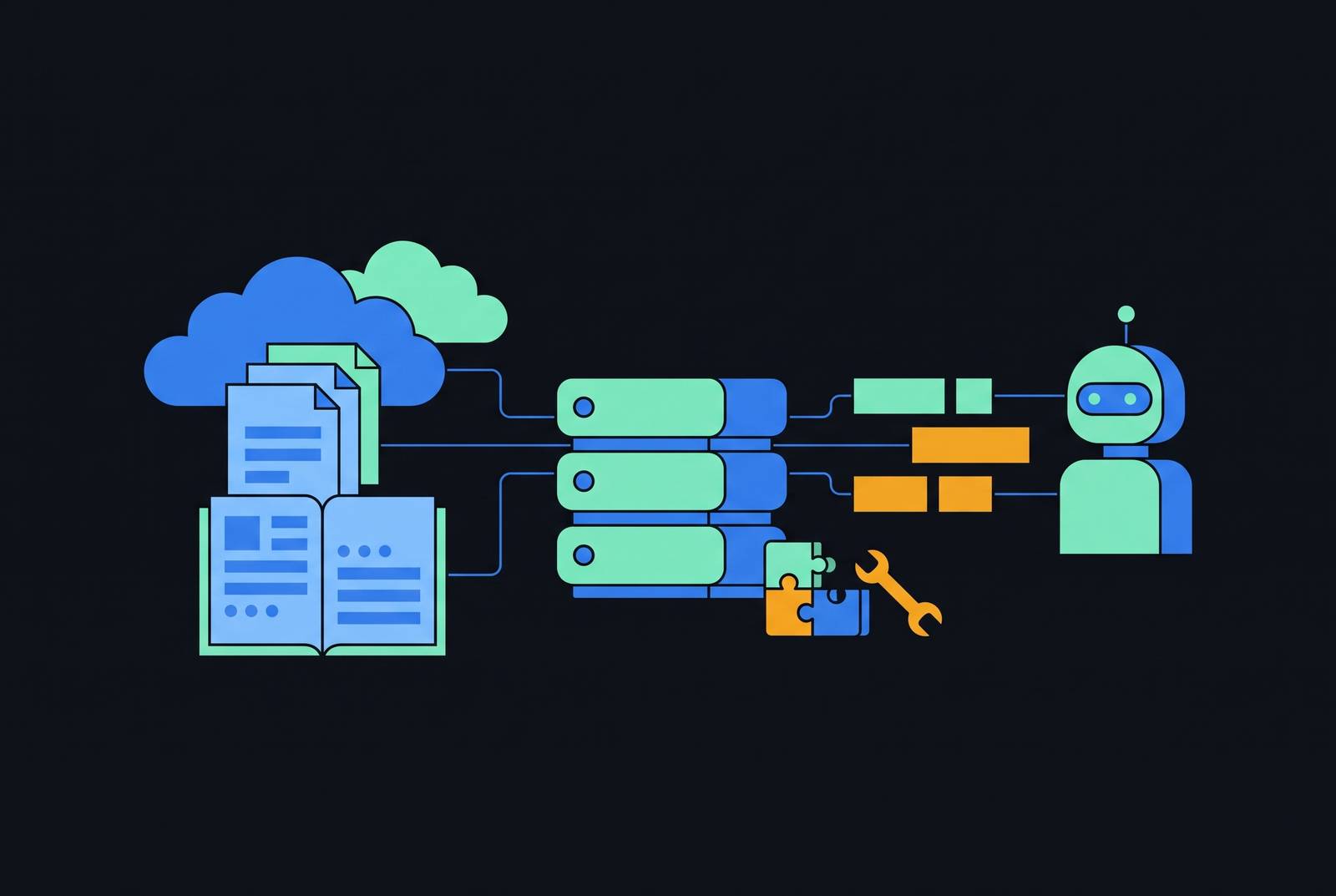
An MCP server for AWS documentation gives agents a live, structured way to get knowledge that their training data cannot keep up to date. Building one starts with understanding that boundary. Documentation tools give up-to-date guidance, action tools use an AWS identity, and the way they are deployed determines how both reach the client. Agents need fresh information and tight limits on what they can do to be reliable, even with a connection to AWS.
Why AI agents operating on AWS training data alone produce unreliable results
AWS’s general availability announcement demonstrates the gap with a question about storing embeddings on S3. The agent gives five correct but out-of-date answers, none of which use Amazon S3 Vectors, which launched in preview July 2025 and went GA December 2025. Its training predates the service. How can an answer be correct yet unsuitable? It can describe a valid approach while missing the option that changes the decision.
Agents without current guidance tend to choose the AWS CLI over CDK or CloudFormation and produce IAM policies broader than necessary. Older training windows can also exclude Amazon Aurora DSQL and Amazon Bedrock AgentCore entirely. The infrastructure they build may work in a demo without being production-ready.
What the MCP protocol does and why it is the right channel for live documentation
MCP gives an agent a standard way to discover and invoke external tools through a uniform JSON-RPC interface. The coding assistant acts as the client, maintaining connections to servers that expose specific capabilities. The server supplies the missing route to current information. Instead of relying on knowledge embedded in its weights, the agent calls a tool and receives structured content it can use to answer questions or write code.
Keeping these parts separate works well for documentation because API references, service guides, and best practices change all the time. Retrieval happens when the question is asked. A common protocol also makes that capability composable across clients and servers. It standardizes access, while the tools determine which information or actions are available.
What the managed AWS MCP Server actually exposes and what each tool does
The managed AWS MCP Server became generally available May 6, 2026, as part of the Agent Toolkit for AWS. It compresses over 15,000 AWS API operations into a small tool surface. A tool for every operation would use up the client’s tool budget. This small set of tools keeps the agent’s choices few and predictable, which reduces hallucination while keeping access to the broader AWS surface.
The knowledge tools divide retrieval into distinct operations. aws___search_documentation searches API references, service guides, best practices, and skills, while aws___read_documentation converts a selected page to Markdown. aws___recommend returns related content, and aws___retrieve_skill supplies a complete procedure maintained by AWS service teams. Skills replaced Agent SOPs at GA, adding correct sequencing and validated practices for tasks agents commonly mishandle. aws___list_regions and aws___get_regional_availability provide region enumeration and service availability checks.
Action tools cross a different boundary. aws___call_aws executes an AWS API operation under the caller’s identity. aws___run_script runs agent-written Python server-side in a sandbox that inherits IAM permissions but has no network access or access to the local file system. Documentation search needs no credentials, so agents can get live knowledge without being given account access. The server has no additional charge, although resources the agent creates and applicable data transfer incur standard AWS charges.
How authentication actually works: IAM, SigV4, OAuth 2.1, and the proxy that bridges them
AWS provides two connection paths for different clients. The OAuth 2.1 path is the simpler default for GUI clients, while AWS recommends the SigV4 proxy path for terminal coding agents and account switching. For OAuth, the IAM role receives AWSMCPSignInOAuthAccessPolicy, and the client connects directly to the endpoint. Claude Desktop, Cursor, and Kiro IDE append ?oauth=initialize to its URL. This route needs no AWS CLI installation.
The proxy route bridges a protocol mismatch. The managed server authenticates with SigV4, while remote MCP clients use OAuth 2.1. MCP Proxy for AWS, packaged as mcp-proxy-for-aws, runs as a local subprocess launched through uvx. It reads the standard AWS credential provider chain, signs outgoing requests with SigV4, and forwards them to the remote endpoint. The client sees a local stdio server and has no need to handle AWS request signing itself.
This path requires AWS CLI 2.32.0 or later and uv, with working AWS credentials for action tools. Documentation search remains available without credentials. The choice is therefore about authenticated access.
The governance layer: IAM condition keys, CloudTrail, and what "the agent can only do what you allow" means in practice
IAM bounds every action the managed server takes. The server adds no permissions of its own. Two condition keys, aws:ViaAWSMCPService and aws:CalledViaAWSMCP, allow policies to distinguish agent-initiated calls from other calls. IAM policies or Service Control Policies can consequently keep MCP access read-only while allowing the same human identity to perform mutating operations.
Visibility complements that separation of authority. CloudTrail captures the server’s API calls, and CloudWatch publishes tool-invocation metrics under the AWS-MCP namespace. AWS states that customer content is excluded from persistent storage, and these controls address different questions, including what the agent may do, what it did, and whether customer content persists.
For teams preparing production access, the recommended setup is agent-specific IAM roles with least-privilege policies and an audit trail verified in CloudTrail. The setup guide also recommends the SigV4 path when tools that can write should be hidden from view entirely. Tool visibility and permission boundaries are related, but they are not interchangeable.
The open-source awslabs suite: when to use a specialized server instead of the managed one
The awslabs/mcp catalog has dozens of open-source servers that each cover a single service under the Apache-2.0 license. Its scope includes CDK/CloudFormation guidance, EKS, Aurora, DynamoDB, Bedrock knowledge base retrieval, and cost analysis. These servers trade breadth for a narrower interface. CDK guidance and cost analysis, for example, can justify their place in the context window even when the managed server is also connected.
The operational distinction is equally clear. AWS operates the managed endpoint and provides its condition keys, metrics, and audit integration, leaving nothing for the customer to host or update. The awslabs servers run as self-hosted local stdio processes, with packages and configuration managed by the user and access bounded by local IAM credentials. For documentation alone, AWS also maintains a local, open-source AWS Documentation MCP server that needs neither an AWS account nor credentials.
Which surface does the task actually require? A narrow service interface that can be audited may be a better fit than broad API access, even when both can fetch useful guidance.
Choosing a deployment pattern before writing a line of code for your own MCP server
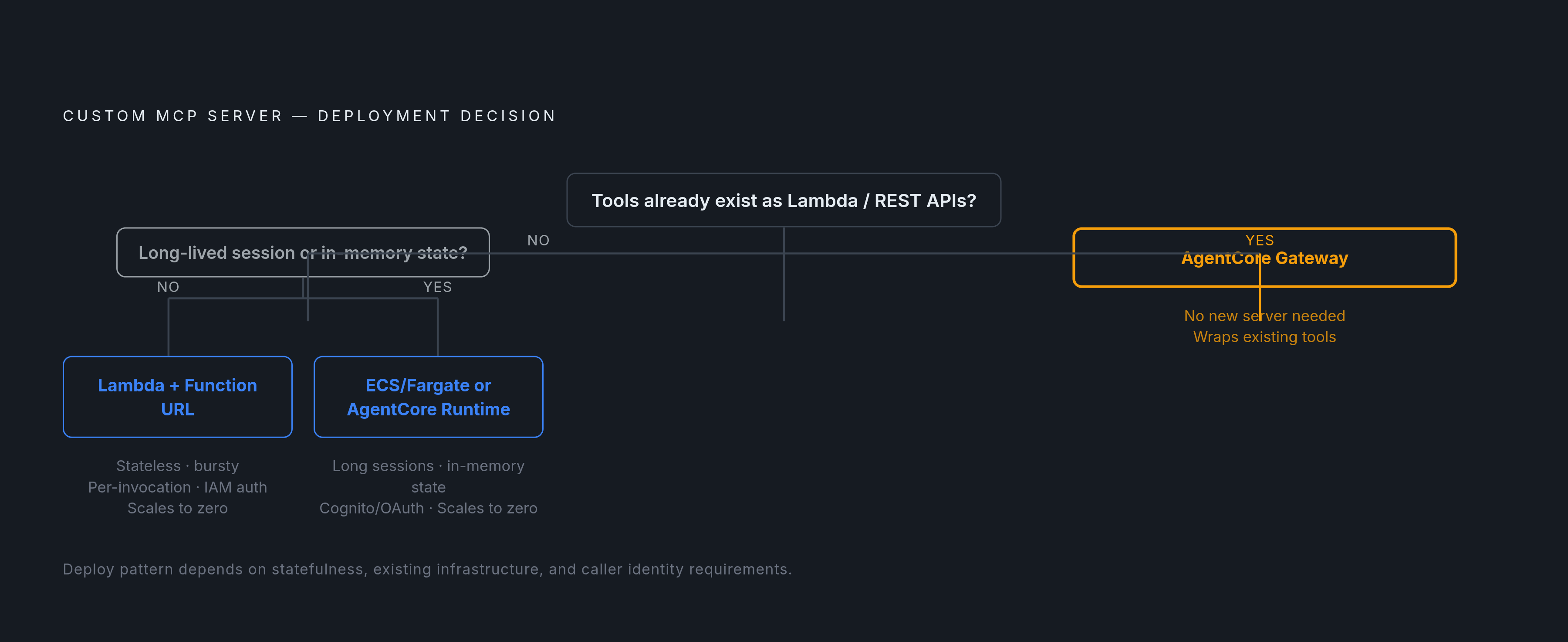
For a custom server, the first decision is architectural. Stateless, bursty tools fit Lambda with a function URL, IAM authentication or an OAuth adapter, and scaling to zero. Long-running or stateful sessions fit ECS / Fargate with an ALB and Cognito OAuth, at a medium operational load and without scaling to zero. The workload, rather than novelty, determines the starting point.
AgentCore Runtime offers framework-agnostic managed infrastructure, built-in identity with Cognito/OAuth, and scaling to zero. It gives the team less to run because AWS manages the execution environment. AgentCore Gateway addresses a different situation, exposing existing Lambda functions or REST APIs as MCP tools with dual authentication and SigV4 to targets. When those tools already exist, there may be no need for a new server.
The practical recommendation is to start with Lambda for most stateless workloads. Its per-invocation pricing fits bursts of tool calls with quiet periods between them, because there is no charge while it is idle. Fargate or AgentCore becomes a good fit when the workload needs long-lived sessions, in-memory state, or managed memory and identity.
Transport and protocol: what every new MCP server must implement in 2026
New remote servers should implement Streamable HTTP at a single /mcp endpoint. The 2025-03-26 MCP specification replaced the older HTTP+SSE transport with JSON-RPC over HTTP POST and optional Server-Sent Events for streaming responses. Transport selection also shapes the authorization work. The 2025-06-18 revision strengthened authorization around OAuth 2.1 with PKCE, RFC 9728 protected-resource metadata, and resource-bound tokens, while stdio servers skip OAuth and read credentials from the environment.
Protocol versions also affect session handling. Version 2026-07-28 and later is stateless, with elicitation supported through Multi Round-Trip Requests, or MRTR, and sampling deprecated. For versions 2025-11-25 and earlier on AgentCore, basic servers use stateless_http=True, while elicitation, sampling, or progress notifications require stateless_http=False. Those settings should not be transferred blindly across versions.
Runtime contracts add the final implementation constraints. AgentCore expects the container at 0.0.0.0:8000/mcp. Lambda uses a Lambda Web Adapter with response streaming enabled so an ASGI application can return SSE chunks to clients.
Deploying a custom MCP server on Lambda: the stateless fast path
For internal machine-to-machine tools whose callers already use AWS identities, the recommended Lambda path starts with IAM authentication. The prerequisites include Python 3.10 or higher, an AWS account with appropriate permissions, and configured local credentials. Tool definitions come before deployment configuration. The MCP Python SDK v2 supplies the standard decorator pattern for defining tools and supports protocol versions accepted by AgentCore Runtime.
The next step is local testing against the same MCP client the agent will use in production. After that, the server is packaged as a Lambda function with a function URL configured for IAM authorization. Allowed principals receive lambda:InvokeFunctionUrl, and clients sign requests with SigV4. This route works without a token server or Cognito.
External clients need the OAuth 2.1 path laid out in the deployment guidance. That architecture fronts the service with CloudFront and WAF, routes through an ALB to an authentication service on Fargate, redirects to Cognito, and stores session and token state in DynamoDB. The MCP server validates token signatures against Cognito before processing requests. The recommendation is to make this authentication stack reproducible with AWS CDK before public exposure.
Deploying on AgentCore Runtime: the managed path for teams that want AWS to own the infrastructure
AgentCore Runtime fits the earlier choice to prioritize managed execution over infrastructure flexibility. It deploys MCP server containers and routes requests with the same session ID to the same microVM, handling stickiness automatically. Built-in identity and Cognito/OAuth support address authentication, while scaling to zero supports idle periods.
Configuration must explicitly select MCP behavior. Setting protocolConfiguration.serverProtocol to MCP in CreateAgentRuntime or UpdateAgentRuntime enables protocol behavior such as JSON-RPC error responses and tool discovery. Otherwise, the runtime uses plain HTTP. The container must also meet the listening-address contract and use the mode appropriate to its MCP version.
The reason to move remains a workload constraint. Lambda remains the default for stateless, bursty tools, while long-lived sessions or in-memory state can justify AgentCore’s managed model. If existing functions or REST APIs already implement the tools, Gateway avoids writing a new server altogether.
Making AWS documentation agent-readable with llms.txt alongside MCP
Even with a way to retrieve it, documentation needs to be well structured. The new llms.txt convention gives agents a Markdown map of key content so they can find it without having to parse every HTML page. Jeremy Howard, co-founder of Answer.AI, proposed it in September 2024. It remains a community proposal outside the IETF and W3C standards. The August 2026 v2 update adds two publisher-emitted link relations for discovery and scopes coverage by path, allowing /docs/llms.txt to describe only documentation.
The two-file pattern separates orientation from depth. A slim llms.txt serves as a table of contents, while llms-full.txt concatenates the linked pages’ Markdown. Cloudflare uses its root file to organize links to files for each product. Stripe adds guidance against hardcoding version numbers from training data and addresses known agent failures around deprecated APIs.
Availability alone does not establish readership. Many valid files receive essentially no requests, and their value is chiefly for IDE-layer agents such as Cursor and Claude Code, with less value for AI search ranking. Documentation kept in sync with product changes, exposed through navigable files and MCP tools, addresses both freshness and usability.
What to watch before connecting a production account: prompt injection, IAM scope, and audit hygiene
An agent with fresh documentation is still at risk of prompt injection. If manipulation leads it to request a destructive API operation, the decisive boundary is whether its IAM identity permits that operation. A broad administrator role makes the consequence real. Least-privilege roles constrain damage even when the agent’s reasoning is misdirected.
Before production access, the recommended posture is to decide explicitly which roles, accounts, and regions the agent may touch and scope its credentials accordingly. The managed server’s condition keys support agent-only restrictions, and its CloudTrail audit trail should be verified before connection. Self-hosted awslabs and custom servers need the same least-privilege rules, but those managed-server condition-key controls do not come with them automatically.